
12 Microsoft CSP Reconciliation Field Groups—and Where They Map in the PSA

Microsoft CSP reconciliation fields identify the customer, subscription, offer, charge event, period, billable quantity and Microsoft-side cost in Partner Center data. This guide applies specifically to the new-commerce invoice reconciliation file. It does not apply the same field rules to legacy reconciliation or new-commerce daily-rated Azure usage.
Those fields prove what Microsoft charged the CSP partner. They do not decide what the MSP should charge the customer. The MSP’s billing policy still determines the customer-facing quantity, sell price and supported PSA destination. Documenting that mapping is the first step; Sync 365 reuses configured mappings and billing profiles to reduce repeated reconciliation and supported PSA update work, while the PSA remains the invoicing system of record.
What you will leave with
- the 12 field groups that answer the main identity, event, period, quantity and cost questions;
- a field-to-rule-to-PSA worksheet you can copy into your own billing documentation;
- a worked
addQuantityand proration example; - a warning about treating a customer credit as a recurring quantity instruction; and
- a clear boundary between documented Microsoft behaviour, an MSP’s own billing policy and Sync 365 automation.
First, use the right Microsoft reconciliation file
Microsoft documents several reconciliation families. Its reconciliation file guidance describes new-commerce invoice reconciliation as aggregated costs, quantities and usage for all new-commerce products in a billing period. New-commerce daily-rated usage is the granular Azure plan usage dataset.
That distinction changes the schema. Microsoft’s daily-rated usage documentation says that dataset excludes Office, Dynamics, Power Apps, Azure reservations, Azure savings plans, perpetual software, software subscriptions and several SaaS categories.
Legacy and Azure IDs differ. In the new-commerce invoice file, use the new-commerce definitions in this guide. Legacy licence reconciliation and daily-rated usage use different subscription keys and quantity rules. If the file family is wrong, stop before mapping or changing a PSA record.
The field is evidence; the billing rule decides the invoice
Microsoft’s Partner Center billing guidance says partners can choose how they bill their customers and can use CustomerId to find the customer’s reconciliation lines. That makes the boundary clear:
- Microsoft evidence establishes the source customer, subscription, offer, event, period, quantity and cost.
- The MSP’s contract and billing configuration establish minimums, inclusions, bundles, exclusions, split billing, markups and sell-price treatment.
- The supported PSA record carries the result into invoicing.
For example, BillableQuantity=45 may be valid Microsoft cost evidence while the customer is contractually billed a minimum of 50. Likewise, EffectiveUnitPrice helps validate Microsoft cost; it should not replace a customer sell price unless an approved pricing rule explicitly says it should.
This is the distinction between a field dictionary and automated Microsoft 365 licence reconciliation. A field tells you what happened in the source. A configured billing profile determines what should happen in the PSA.
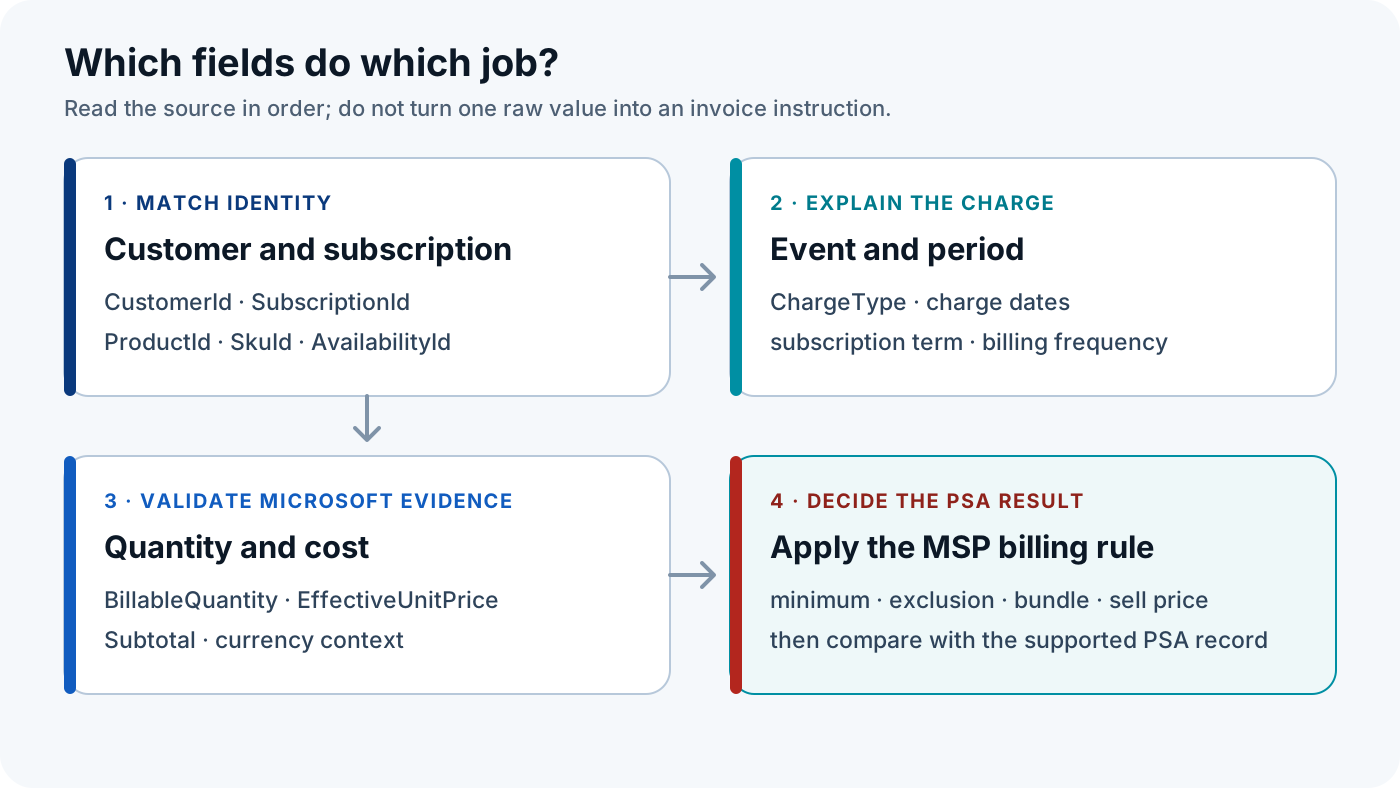
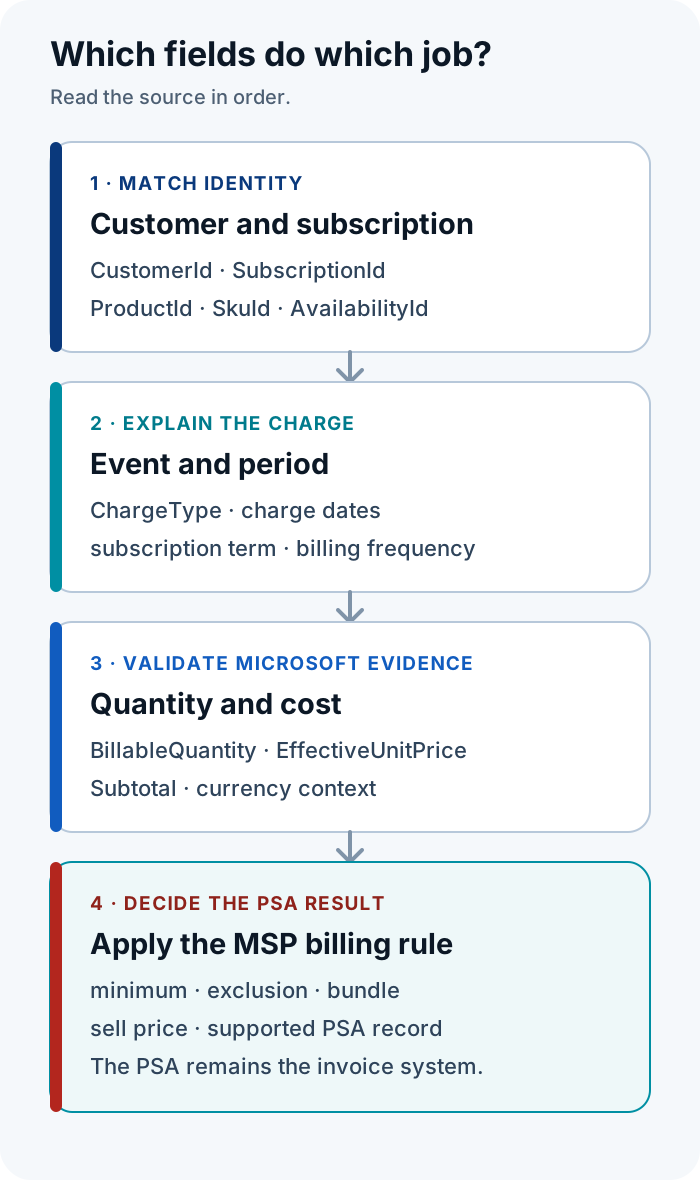
The 12 Microsoft CSP reconciliation field controls
The 12 controls below are field groups rather than 12 unrelated columns. Several billing decisions are only safe when related fields are read together. PSA destinations are conceptual record classes: exact objects and supported behaviour depend on ConnectWise Manage, Autotask PSA or HaloPSA and the configured workflow.
1–3. Match the customer, subscription and offer
Microsoft’s new-commerce invoice reconciliation field dictionary defines the customer, subscription, product, SKU and availability identifiers used below. Names and descriptions help a person review a line, but the maintained cross-reference should use durable identifiers.
| # | Microsoft field(s) | What Microsoft says it means | Billing decision it informs | Do not assume | PSA destination class | What to check | What a discrepancy means | Owner |
|---|---|---|---|---|---|---|---|---|
| 1 | CustomerId | The customer's Microsoft Entra ID. | Which customer mapping owns the line. | A display name or domain is a unique key. | Customer, company or account mapping. | The ID matches one maintained active customer cross-reference. | No PSA record should change until billing or operations resolves a missing, duplicate or conflicting customer mapping. | Billing admin; operations for an unmapped tenant. |
| 2 | SubscriptionId | The new-commerce billing subscription identifier; Microsoft notes that it differs from the subscription ID shown in the partner admin console. | Which subscription requires separate term, price or destination treatment. | It has the legacy-file meaning or is the partner-admin-console ID. | Intended recurring agreement or contract line, or maintained subscription mapping. | The subscription points to the expected offer, customer rule and supported recurring line. | Identical SKUs may have been merged incorrectly, or a subscription mapping may be absent. | Billing admin with the PSA admin. |
| 3 | ProductId + SkuId + AvailabilityId | Identifiers for the product, SKU and availability represented by the line. | Which Microsoft offer maps to the MSP's billable product or service. | Product name alone is a durable mapping key, or every PSA uses all three IDs in the same way. | Product or service catalogue cross-reference. | The maintained offer key resolves to one active billable item for this customer rule. | A mapping fault may otherwise look like a missing line or quantity difference. | PSA or product-catalogue owner. |
SubscriptionId matters when two subscriptions with the same licence name need different terms, prices or PSA treatment. The cross-reference should preserve that difference rather than collapsing everything into one product-name match. See the site’s narrower explanation of subscription-level billing.
4–8. Explain the event and its time period
A quantity or negative amount is not enough to explain a line. Microsoft’s charge-type reference separates recurring cycle charges, quantity changes, conversions, cancellations and customer credits. Its billing-scenario guidance distinguishes the subscription term from the charged period and says TermAndBillingCycle is not standardised.
| # | Microsoft field(s) | What Microsoft says it means | Billing decision it informs | Do not assume | PSA destination class | What to check | What a discrepancy means | Owner |
|---|---|---|---|---|---|---|---|---|
| 4 | ChargeType | The transaction class, including cycle, quantity, conversion, cancellation and credit events. | Whether the line is normal recurring activity, a mid-cycle change, a cancellation/conversion or a credit to review. | A negative line automatically means a negative recurring quantity. | Treatment decision before any supported PSA change. | The charge type agrees with related dates, quantities and reference lines. | The line may need credit, proration or conversion treatment rather than a quantity overwrite. | Finance for credits; billing or operations for subscription events. |
| 5 | ChargeStartDate + ChargeEndDate | The period for which the reconciliation line is charged. | Which period and possible proration treatment the line supports. | Charge dates always equal the subscription term. | Effective or cancelled-date input, or retained proration evidence, subject to PSA configuration. | The charge window agrees with the event and the intended customer billing period. | A mid-cycle change or date-rule difference may explain the variance. | Billing admin; PSA admin for date rules. |
| 6 | SubscriptionStartDate + SubscriptionEndDate | The start and end of the subscription term. | Whether the contract term or renewal assumption is consistent with the source. | A partial charge window changes the underlying subscription term. | Term or renewal validation; evidence before changing contract dates. | The term dates agree with the mapped subscription and approved customer arrangement. | The wrong subscription may be mapped, or a renewal/term decision needs operations or procurement review. | Operations or procurement with finance. |
| 7 | BillingFrequency | The billing cadence; Microsoft documents monthly, annual and blank full-term examples. | Which billing-plan assumption to use when interpreting the charge dates. | A blank value always means missing data. | Billing cadence or billing-profile check. | Frequency, charge dates and customer billing rule agree. | The mapped billing profile may use the wrong cadence or an upfront charge may have been misread. | Billing admin. |
| 8 | TermAndBillingCycle | A term and cycle descriptor that Microsoft says varies by subscription type and is not standardised. | A human review aid when checking term and billing plan. | It is sufficient as the only term key. | Review evidence rather than an automatic field overwrite. | It agrees with subscription dates, charge dates and billing frequency. | The descriptor cannot resolve the term; use the dates and route an unresolved contract question to the billing owner. | Billing admin. |
These fields can inform effective dates, cancelled dates and proration evidence, but there is no universal cross-PSA field mapping. The safe statement is narrower: use them to explain the source event, then verify the supported behaviour for the PSA and configuration. For more context on the relationship between term and plan, see Microsoft NCE billing models.
9–12. Validate quantity, cost and currency
The quantity and price controls answer what Microsoft billed the partner. Microsoft explicitly says to use BillableQuantity for reconciliation rather than generic Quantity. It also recommends EffectiveUnitPrice, not UnitPrice, for precise new-commerce licence cost calculations because the effective value incorporates documented adjustments.
| # | Microsoft field(s) | What Microsoft says it means | Billing decision it informs | Do not assume | PSA destination class | What to check | What a discrepancy means | Owner |
|---|---|---|---|---|---|---|---|---|
| 9 | BillableQuantity | The billable units on the new-commerce invoice reconciliation line. | The Microsoft quantity to compare before applying the customer rule. | It always equals the customer invoice quantity. | Quantity comparison, followed by the configured minimum, exclusion, bundle, split or calculated rule. | The value agrees with the source line, event and charge period, then compare the rule-derived result with the PSA quantity. | It may be a Microsoft event/date effect, an intentional customer rule or a missed supported PSA update. | Billing admin; commercial owner if policy is undefined. |
| 10 | EffectiveUnitPrice | The final per-unit price after relevant billable days, discounts, promotions and other adjustments. | Microsoft unit-cost and proration validation. | UnitPrice is equivalent, or Microsoft cost is the customer sell price. | Cost or margin validation; sell-price change only under an explicit approved policy. | The effective price, event, period and pricing rule explain the expected cost. | A promotion, tier, credit, proration effect or pricing-policy issue needs finance review. | Finance or pricing owner. |
| 11 | Subtotal | The pretax Microsoft-side line cost. | Whether the source line and any aggregate cost control reconcile at the same grain. | Totals can be compared without matching dates, charge type, currency, tax and aggregation grain. | Cost-total and variance evidence. | Recalculate or group only at a defined customer, subscription, offer, period and charge-type grain. | The comparison may mix unlike lines, or a credit, correction, FX or rounding treatment may be present. | Finance. |
| 12 | Currency plus PricingCurrency and PCToBCExchangeRate where relevant | Billing currency, pricing currency and the pricing-to-billing currency exchange context exposed on the line. | Whether quantity, unit cost and subtotal are being compared in the correct currencies. | A numerically equal amount is a valid cross-currency match. | Currency check and finance review. | The source billing currency, pricing currency/FX context and intended PSA currency agree. | The variance may be currency or FX treatment rather than quantity or price drift. | Finance. |
The customer quantity can still differ legitimately. A contract may specify a minimum, include seats in a bundle, exclude a population or split one Microsoft count across several recurring lines. This is where custom licence or managed-user logic matters: the source quantity is an input, not the whole customer-billing instruction.
When you need more evidence
Keep these supporting fields available without turning the worksheet into a second field dictionary: InvoiceNumber for invoice traceability; OrderId, OrderDate and ReferenceId for related transactions; PriceAdjustmentDescription and CreditReasonCode for adjustments; Total and TaxTotal for tax-aware checks; and publisher/product-category fields when the product family affects treatment.
Copy this field-to-billing worksheet before changing a PSA record
The worksheet records the source evidence, the MSP rule and the destination together. Use one row per decision or exception. The first row below is deliberately blank; the second is illustrative and contains no real tenant, invoice or PSA record.
| Source file | Microsoft field(s) | Sample value | Microsoft meaning | Customer billing rule | PSA destination class | PSA record ID/reference | Validation evidence | Discrepancy meaning | Owner | Resolution note |
|---|---|---|---|---|---|---|---|---|---|---|
| ________ | ________ | ________ | ________ | ________ | ________ | ________ | ________ | ________ | ________ | ________ |
| New-commerce invoice reconciliation | CustomerId + SubscriptionId + offer key + BillableQuantity | Illustrative IDs; quantity 5 | Mapped customer and subscription with five Microsoft-billable units | Apply the documented customer minimum, inclusion or direct-quantity rule | Supported customer and recurring agreement/contract line | Internal maintained reference—not a fabricated ID | Source line + mapping + approved billing profile + current PSA record | Missing mapping, intentional policy difference or stale PSA quantity | Billing admin; PSA or commercial owner if unresolved | Record the rule applied, decision and retest evidence |
Use the worksheet in this order:
- Confirm the file family. Check the Partner Center export name and schema against Microsoft’s new-commerce invoice reconciliation documentation. The export and official field dictionary are the evidence. A legacy or daily-rated schema means the identifiers and quantity rules in this guide are not interchangeable; the billing owner stops the review and selects the matching Microsoft guide.
- Match durable identities. Check
CustomerId,SubscriptionIdand the product/SKU/availability key against the MSP’s maintained customer, subscription and product mappings. Those mappings and the source line are the evidence. A missing, duplicate or conflicting match means no PSA record should change until the billing or PSA owner resolves it. - Explain the event and period. Check
ChargeType, charge dates, subscription dates, billing frequency and the term descriptor against Microsoft’s charge-type definitions and the exported line. A mismatch can mean proration, conversion, cancellation, credit or an incorrect term assumption; the billing owner investigates before using the line as a recurring quantity instruction. - Validate Microsoft quantity and cost. Check
BillableQuantity,EffectiveUnitPrice,Subtotaland currency directly against the source line and Microsoft’s definitions. A variance means finance must first separate a source adjustment, date/proration effect, FX context or calculation-grain problem from a customer-policy difference. - Apply the customer rule and update only the supported PSA destination. Check the approved contract, billing profile or configuration for minimums, exclusions, bundles, splits and sell-price treatment, then compare the rule-derived result with the supported PSA record. An undefined rule belongs with the commercial owner; an unmapped or unsupported destination belongs with the PSA or billing owner. The PSA remains the invoicing system of record.
For larger teams, billing reconciliation for finance teams provides the wider ownership context around finance, operations, licensing and commercial decisions.
Worked example: a mid-cycle add is not a complete invoice instruction
This scenario is illustrative and uses no customer data or invented prices.
A new-commerce reconciliation line contains:
- a valid
CustomerId; - one mapped new-commerce
SubscriptionId; - a maintained product/SKU/availability offer key;
ChargeType=addQuantity;- a partial
ChargeStartDateandChargeEndDatewindow; BillableQuantity=5;- an adjusted
EffectiveUnitPrice; - a pretax
Subtotal; and - the billing currency.
The Microsoft fields establish who incurred the charge, which subscription and offer changed, what event occurred, which period was charged, how many units Microsoft treated as billable and what Microsoft charged before tax.
They do not establish whether the customer should be billed five units. The contract may specify a minimum, an included quantity, a managed-user bundle, an approved exclusion or a different sell-price rule. The documented MSP policy decides the intended customer quantity and price; the supported PSA mapping identifies the agreement or contract line that should carry that result.
When that policy is encoded in a billing profile, Sync 365 can apply the configured mapping, quantity logic and proration treatment during recurring reconciliation, then keep the supported PSA billing record aligned. Finance does not have to rebuild the same decision from the raw line each time.
Failure case: do not turn a customer credit into a negative recurring quantity
Microsoft documents customerCredit separately from quantity-change charge types. Its reconciliation guidance also says negative amounts should be interpreted using ChargeType rather than by sign alone.
A customerCredit line is therefore evidence of a credit or adjustment. It is not sufficient evidence to reduce an ongoing recurring PSA quantity.
Recommended human control: finance reviews the credit reason and related source lines, then decides the accounting and customer-billing treatment under the MSP’s policy. This is an optional operating control, not a Microsoft status or a Sync 365 screen.
When the worksheet becomes repeated manual work
The worksheet is useful for documenting rules, validating a sample and resolving genuine exceptions. It becomes inefficient when staff repeat the same customer match, product lookup, quantity comparison, proration check, policy application and PSA update across many tenants and lines.
The boundary between each layer should remain visible:
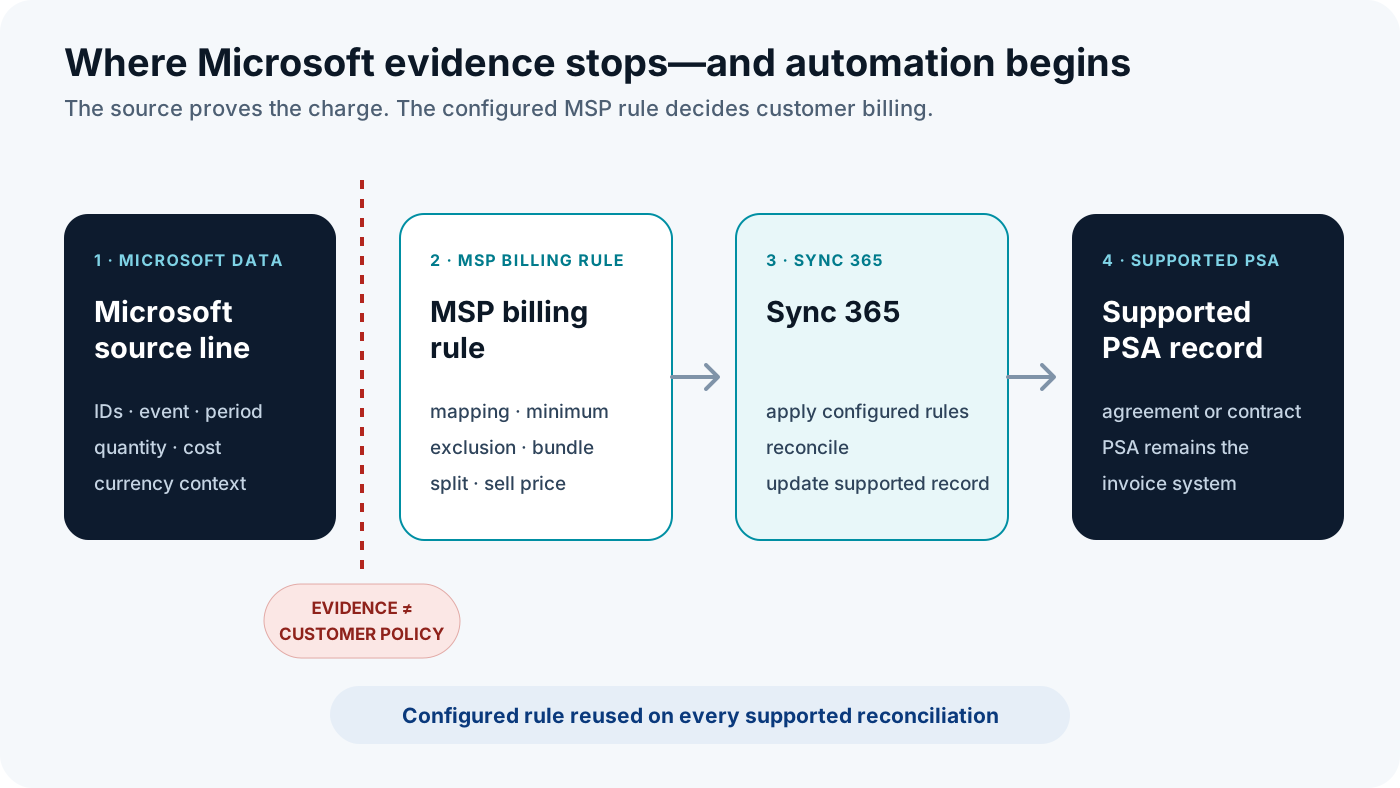
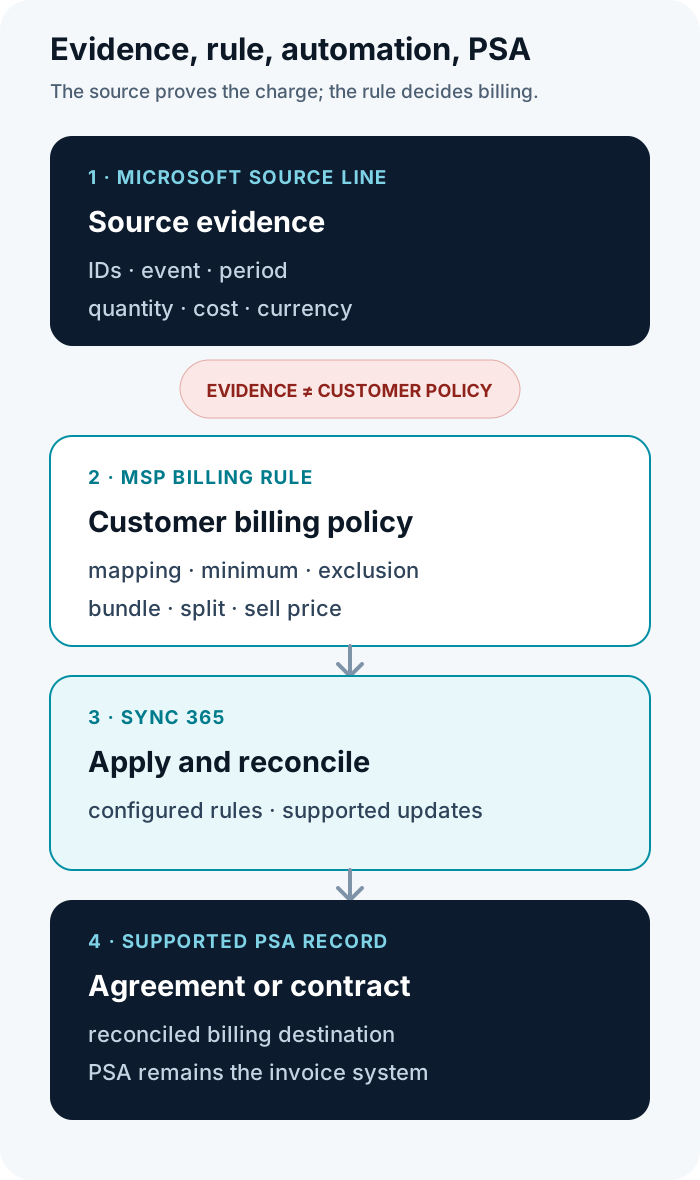
| Manual worksheet task | Sync 365 role |
|---|---|
| Re-match customer and subscription lines | Reuse configured customer, licence and subscription mappings where supported. |
| Reapply minimum, exclusion, split or calculated rules | Apply configured billing-profile and customer rules. |
| Recheck mid-cycle changes and proration | Support configured proration and subscription-level handling. |
| Compare source-derived quantities with PSA records | Reconcile the configured result against supported PSA billing records. |
| Rekey supported agreement or contract changes | Automate supported PSA record updates while the PSA remains the system of record. |
| Investigate every normal line | Let finance focus on unresolved mappings, policy decisions and genuine discrepancies. |
Exact behaviour depends on the PSA, configuration and supported workflow. Sync 365 supports Microsoft 365 licence reconciliation, billing profiles, mappings, proration, subscription-level handling, exclusions, filters, minimums, split billing and calculated custom licence logic where configured. Supported PSA workflows include ConnectWise Manage, Autotask PSA and HaloPSA; it does not replace PSA invoicing.
See how Sync 365 maps rules and updates supported PSA records or review the Autotask PSA billing reconciliation path for one platform-specific route.
Microsoft CSP reconciliation field FAQs
What are Microsoft CSP reconciliation fields?
They are the identifiers, dates, quantities, prices and transaction attributes in Partner Center reconciliation line items. They explain Microsoft-side charges and credits; they do not independently define the MSP’s customer billing policy.
Which quantity field should an MSP reconcile?
For the new-commerce invoice reconciliation file, Microsoft directs partners to use BillableQuantity rather than generic Quantity. The customer rule can still produce a different PSA invoice quantity because of minimums, inclusions, bundles, exclusions or calculated logic.
Should an MSP use UnitPrice or EffectiveUnitPrice?
Use EffectiveUnitPrice for Microsoft new-commerce licence cost validation. Microsoft says it reflects relevant adjustments and recommends it over UnitPrice for precise cost calculations; it remains cost evidence, not automatically the customer’s sell price.
Which fields identify the customer, subscription and product?
Use CustomerId for the Microsoft customer, new-commerce SubscriptionId for the billing subscription and the product/SKU/availability identifier group for the offer cross-reference. Confirm the file family first because legacy and daily-rated schemas use different identifier rules.
How do Microsoft reconciliation fields map to a PSA?
Conceptually, the customer key maps to a customer, company or account; the subscription maps to the intended recurring agreement or contract line; and the offer key maps to a product or service. Quantity, date and cost fields then inform the configured billing rule and validation rather than universally overwriting one PSA field.
Can Sync 365 automate this reconciliation work?
Yes. Sync 365 automates Microsoft 365 licence reconciliation, applies configured billing profiles and mappings, supports proration and customer-specific rules, and updates supported PSA billing records across ConnectWise Manage, Autotask PSA and HaloPSA workflows. Exact behaviour depends on platform and configuration, and the PSA remains the invoicing system of record.
Stop rebuilding the same reconciliation in a spreadsheet
Microsoft data establishes the source charge. The MSP’s documented rule establishes the customer billing outcome. The PSA remains the invoice system of record.
Sync 365 connects those layers so configured mappings and billing rules can be reused instead of rebuilt line by line. Bring one reconciliation file, one customer billing rule and the supported PSA record you currently update by hand, and see how that workflow can be applied repeatedly.
Map one real reconciliation line to the PSA
Bring one Microsoft reconciliation file, one customer billing rule and the supported PSA record you update today. We will walk through the mapping, rule and reconciliation workflow without replacing PSA invoicing.