
AutoMap by Sync 365
Microsoft licence billing, without the mapping work
Set your billing rules once. AutoMap handles the mapping as new Microsoft subscriptions appear—routing each one to the right Sync 365 billing profile and PSA agreement.

New Microsoft subscriptions should not create another mapping job for your billing team. AutoMap is Sync 365’s automated licence mapping capability. It turns the billing decisions you already make into reusable rules, then applies them as new subscriptions appear.
Choose the correct Sync 365 billing profile, Microsoft commitment-term treatment and PSA billing destination once. AutoMap can then approve, map and start syncing matching subscriptions automatically, or place each new mapping into a pending queue when your team wants to review it first.
How AutoMap removes the repeat work
Without reusable rules, every new Microsoft subscription can require the same checks: which licence is it, which commitment and billing term applies, which Sync 365 billing profile should control it, and where should it appear in the PSA?
AutoMap captures those answers once and reuses them. When a matching subscription appears, Sync 365 can follow the configured route instead of asking the billing team to rebuild the mapping from scratch.
Select the Microsoft licences that should use AutoMap rules.
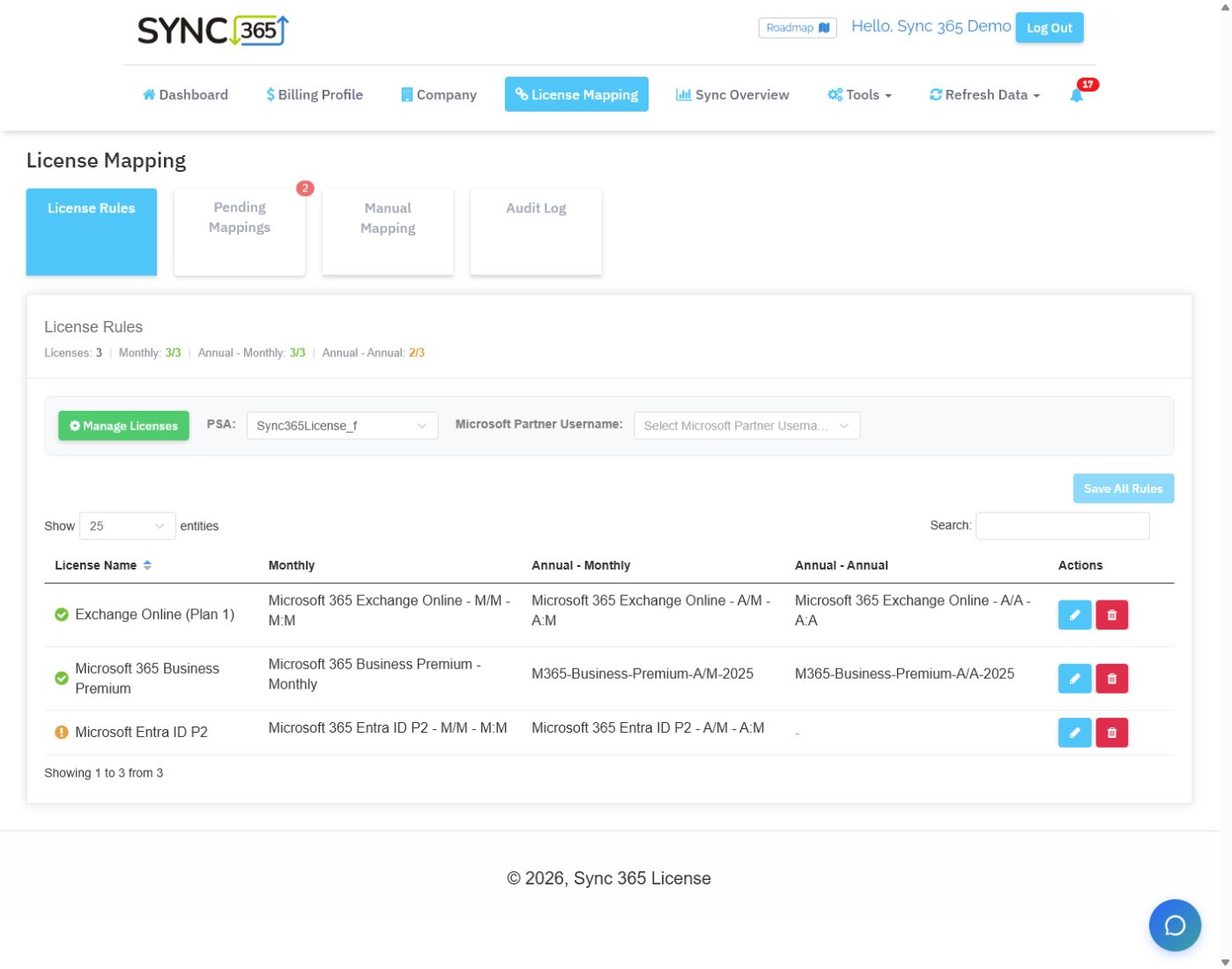
Connect monthly and annual billing combinations to the correct billing profile and PSA billing item.
Choose the default PSA agreement or contract for each company and filter group.
Start matching mappings automatically or send them to pending approval.
Use a separate rule for each Microsoft commitment term
A single Microsoft licence name can be sold under different commitment and billing combinations. AutoMap lets you configure the appropriate default for each supported term instead of treating every subscription the same.
| Microsoft term | AutoMap default | Why it matters |
|---|---|---|
| Monthly commitment | Monthly billing profile and PSA billing item | Keeps flexible monthly licences aligned with the PSA record intended for monthly billing. |
| Annual commitment, billed monthly | Annual-monthly billing profile and PSA billing item | Separates the annual commitment from the way the customer is charged each month. |
| Annual commitment, billed annually | Annual-annual billing profile and PSA billing item | Routes annual upfront billing to the correct PSA billing item and destination. |
Create the Sync 365 billing profile during initial setup
When the MSP selects a PSA product, service or item during initial licence mapping, Sync 365 can create the corresponding billing profile at the same time. This keeps the Microsoft licence, commitment term, billing rules and PSA billing-item decision together.
Route subscriptions to the right company and filter group
Select the default PSA billing destination for each company. Where a company uses licence filters, choose the appropriate destination for each filter group so every population follows the intended billing route.
Licence filters decide which users or licences belong in each population. AutoMap applies the configured billing-profile and destination defaults when a new mapping is created for that population.
Automate trusted mappings without losing control
The approval choice is set per company. Straightforward customer mappings can move automatically, while companies with unusual agreement structures or extra controls can stay in the review queue.
Save time every time your Microsoft estate changes
- Remove repeated billing-profile and PSA destination decisions when new subscriptions appear.
- Apply Microsoft commitment terms consistently instead of relying on team memory.
- Reduce manual setup across customer tenants and filtered billing groups.
- Choose automation for trusted customer structures and review for exceptions.
- Reduce the chance of a new subscription remaining unmapped before the next billing cutoff.
AutoMap FAQ
What is AutoMap?
AutoMap is Sync 365’s automated Microsoft licence mapping capability. It uses reusable rules to connect new Microsoft subscriptions to the intended Sync 365 billing profile and supported PSA billing destination.
Does every new mapping have to be approved manually?
No. Approval is configured per company. Automatic mode approves and starts syncing matching new mappings; manual mode raises each new mapping as pending for review.
Can AutoMap handle different Microsoft commitment terms?
Yes. You can configure separate defaults for monthly commitment, annual commitment billed monthly, and annual commitment billed annually.
Does AutoMap replace the PSA?
No. The PSA remains the billing system of record. AutoMap applies the configured Microsoft-to-PSA mapping logic and synchronises supported billing records according to the PSA and configuration.
AutoMap rules
Configure Microsoft-to-PSA mappings once
Choose the billing profile and PSA destination for each Microsoft licence term, then let AutoMap apply those rules automatically or raise new mappings for approval.
See AutoMap in action
Stop mapping every new Microsoft subscription by hand
See how AutoMap turns your licence, term, billing-profile and PSA destination choices into reusable rules.Bring your Microsoft licence terms, PSA products and customer agreement structure into a guided demo. We’ll show how AutoMap can remove repeat mapping work while your PSA remains the billing system of record.