
Sync 365 product overview
Microsoft billing reconciliation built around how MSPs bill
Connect Microsoft 365, Azure billing data, managed-user counts and custom recurring rules with supported PSA records. Sync 365 automatically compares what you deliver with what your PSA is set to bill, then keeps supported records up to date using your configured sync or approval controls. Your PSA remains the system of record.

Sync 365 is the CSP billing layer between Microsoft and the MSP's PSA. It brings licence reconciliation, Azure consumption, managed-user counts and custom recurring billing logic into one controlled workflow. That gives finance, operations and leadership a clearer path from source data to supported PSA billing records.
One product, four connected billing workflows
Start with the source data, apply the billing logic your MSP uses, then align the supported PSA record that feeds the invoice.
Billing reconciliation needs more than a source count
Basic sync can copy a licence count. MSP billing reconciliation also needs the rules around that count: proration, minimums, exclusions, filters, Azure markup, customer mappings, and department, site or franchise splits.
For example, 10 billable Business Premium users can also mean 10 managed support users, 10 Microsoft 365 backup seats, 10 antivirus seats and 10 web filtering seats. Sync 365 can use one trusted count to drive those related PSA agreement or contract lines while applying the rules for that customer.
Explore custom licence billingSee managed-user billing
Connect and map once. Let Sync 365 handle the repeat work.
Link Microsoft billing sources, customer tenants and supported PSA records.
Set licence mappings, billing profiles, filters, exclusions, minimums and customer rules.
Sync 365 applies your rules and compares the latest Microsoft, Azure and user-driven quantities with the PSA, calculating any updates needed.
Licence changes sync automatically where configured; Azure can follow your approval or auto-approval workflow.
Exact record behaviour depends on the PSA, billing workflow and configuration. Sync 365 applies the configured logic without replacing PSA invoicing.
See the detailed workflowWatch the interactive demo
Built to fit the PSA your MSP already uses
Sync 365 supports billing workflows across ConnectWise Manage, Autotask PSA and HaloPSA. Your PSA remains the system of record for customer, agreement or contract, billing history and invoice data.



Review integrationsValidate your PSA workflow
More ways to connect the customer workflow
Clearer billing control for every role
See finance and operations visibilityCalculate potential revenue leakage
Customer proof, kept in context
“In the first week using Sync 365, we discovered over $600/month that we were not billing our customers. This is worth every cent!”
Anthony B, Technical Services Manager
Results vary by MSP and billing environment. See how other teams reduced billing administration, handled invoice queries and automated customer-specific recurring billing without treating individual results as an expected average.
- Billing administration time case study
- Invoice query reduction case study
- Custom billing automation case study
Read customer storiesSee pricing
Start a full trial, or get a guided walkthrough
The 30-day free trial lets you explore Sync 365 directly, including Microsoft licence reconciliation, Azure, managed-user and custom recurring billing workflows, plus contact sync. Book a demo for a guided product tour and more advanced guidance on complex minimums, split billing, multi-site logic or PSA-specific rules—before or during your trial.
Inside Sync 365
See the MSP billing control centre in action
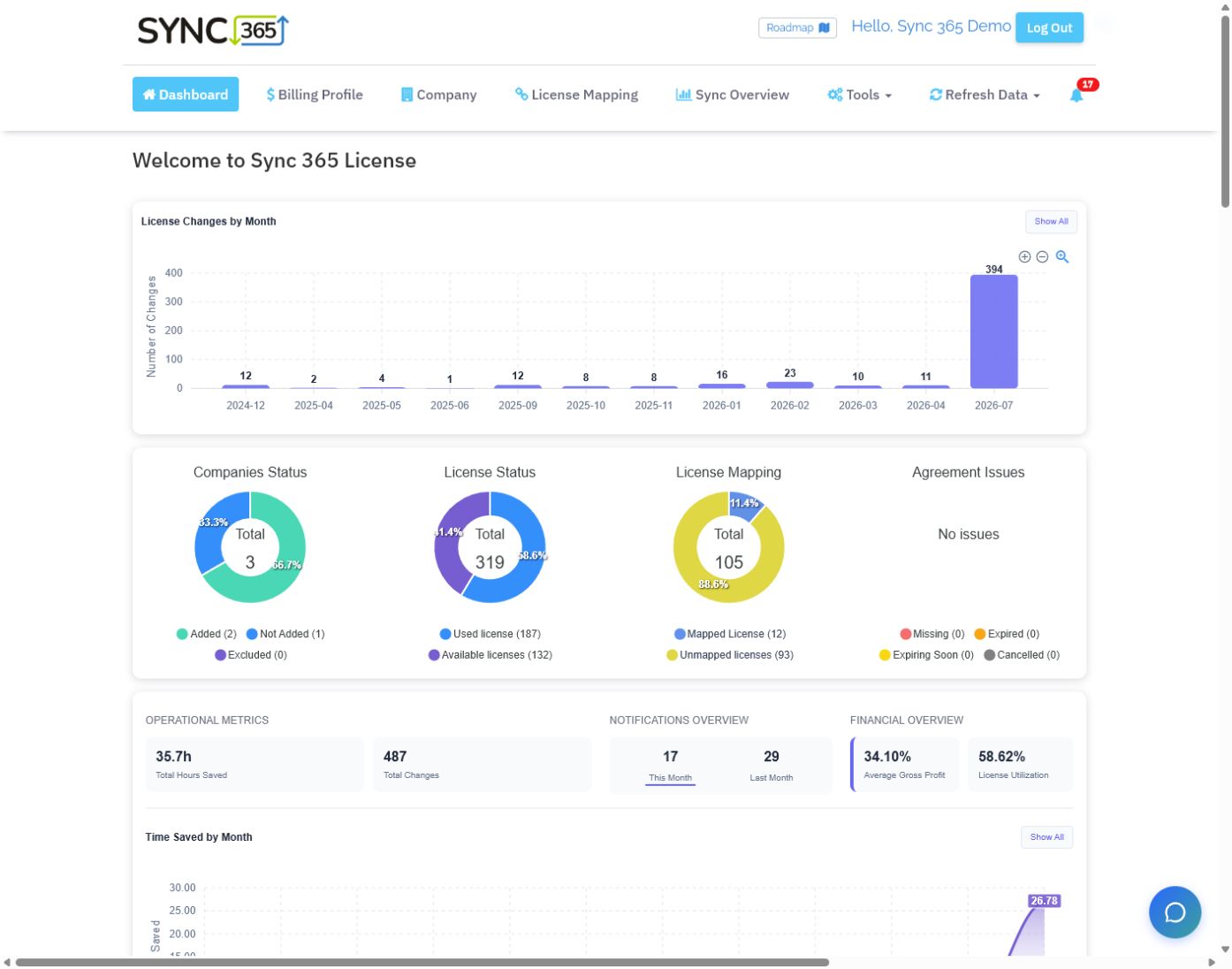
A live dashboard turns licence movement, mapping coverage, time saved and margin signals into one operational view for finance and service teams.
Choose the right next step
Find the billing gaps in your own workflow
Explore every Sync 365 billing workflow and contact sync in the trial, or book a guided demo for advanced guidance on calculated services, mixed Microsoft subscriptions, multi-site billing or PSA-specific rules.The full 30-day trial is available without a credit card. Your PSA remains the billing system of record.