
Custom licence billing
Custom licence billing for MSP recurring services
Create the billable count that matches the service, then keep the related recurring PSA agreement lines aligned in ConnectWise Manage, Autotask, or HaloPSA.

MSP billing does not always start with a single Microsoft licence count. Sometimes the right billing source is an active managed-user count, a filtered Microsoft licence group, a department or site-based count, a customer minimum, a calculated custom licence, or a franchise, location, or business-unit rule.
Basic licence sync can copy a Microsoft count into the PSA. That helps, but it does not always match how MSPs actually bill managed services. Sync 365 lets you create the billable count that matches the service, then use that count to keep related PSA agreement lines aligned.
Turn one billable count into multiple PSA agreement lines
For example, 10 billable managed users could update managed support seats, Microsoft 365 backup seats, antivirus seats, web filtering seats, security tool licences, customer minimums, department or site splits, custom PSA agreement rules, and overage charges where those services apply.
Instead of manually checking every related agreement line each month, Sync 365 keeps quantities aligned with how your MSP actually sells and supports the client.
Minimums, exclusions, filters, and customer-specific rules
Real MSP billing has exceptions. Sync 365 supports the billing logic that simple licence mirroring misses:
- Minimum billable quantities.
- Excluded users and included users.
- Department filters.
- Site or location filters.
- Customer-specific mappings.
- Agreement splits.
- Franchise or business-unit rules.
- Calculated custom licence counts.
This helps finance and operations turn scattered billing rules into a repeatable process.
When the challenge is splitting standard Microsoft licence counts across sites, departments, franchises or PSA companies, see licence filters and split billing.
When the final quantity needs several additions and deductions—such as protected mailboxes minus bundled managed users—see calculated custom licence and overage billing.
The PSA stays the system of record
Sync 365 does not replace your PSA. It helps you calculate and reconcile the billable quantity before updating supported PSA agreement or contract lines.
That means your team keeps invoicing from ConnectWise Manage, Autotask, or HaloPSA while Sync 365 handles the recurring billing logic that usually lives in spreadsheets.
Is this only for Microsoft 365 licences?
No. Microsoft 365 counts are one source. Sync 365 can also work with filtered managed-user counts, minimums, custom rules, and calculated billing logic for recurring services MSPs sell alongside Microsoft.
Custom licence billing FAQ
What is a custom licence?
A custom licence is a billable count created from the rules your MSP uses to sell a recurring service. It may be based on Microsoft licences, managed users, departments, sites, minimums, exclusions, or customer-specific logic.
Is custom licence billing just mirroring Business Premium into the PSA?
No. Mirroring a Microsoft SKU is useful when the PSA line should match that SKU, but custom licence billing can also use active managed users, filtered Microsoft licence groups, customer minimums, department/site/franchise rules, and calculated custom licences to drive the recurring services MSPs actually bill.
Can one billable count update several services?
Yes. The billable count your MSP actually uses can drive multiple related PSA agreement lines, helping the MSP keep support, backup, security, and other recurring services aligned.
Calculated recurring services
Build billable counts beyond Microsoft SKUs
Calculated custom licences turn managed users, mailboxes, security services and overage rules into quantities that can feed recurring PSA lines.
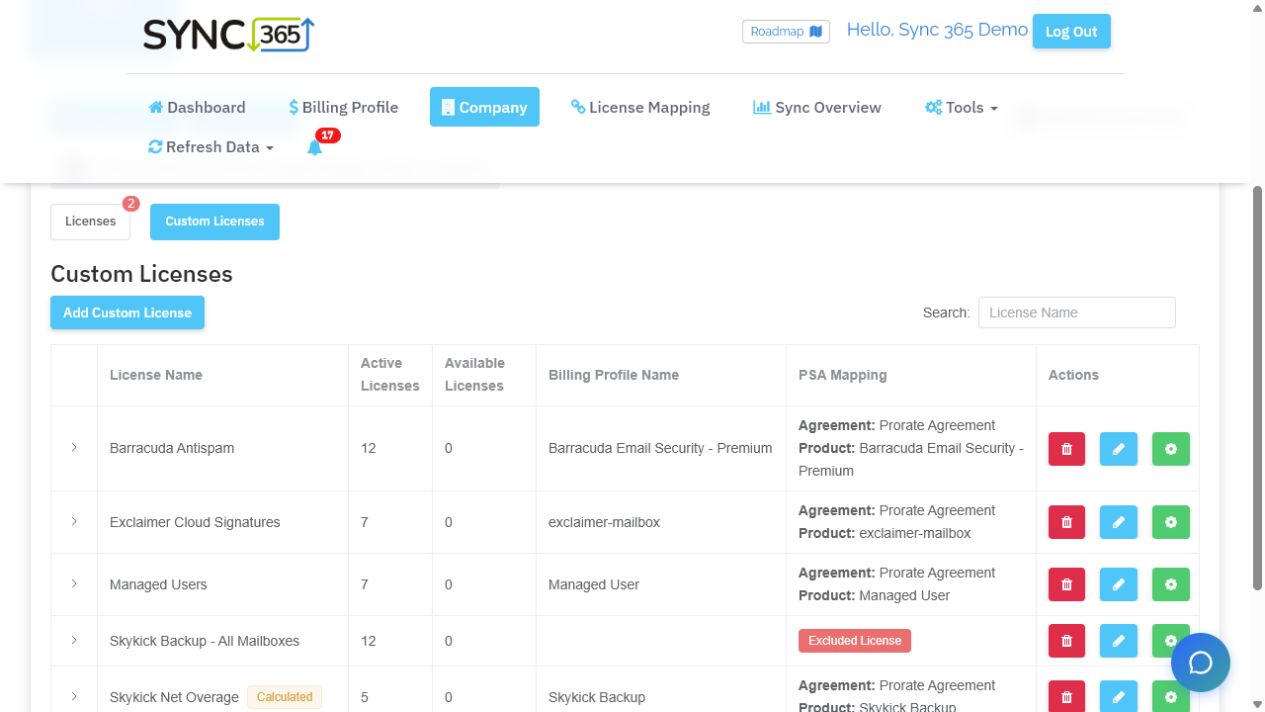
Billing workflow demo
See how your recurring services should be counted
Connect Microsoft and managed-user counts to the recurring PSA lines they should update.Bring your Microsoft licence, Azure consumption, managed-user, and recurring-service billing rules into a demo. We’ll compare them with your PSA agreement quantities, show where drift appears, and outline how Sync 365 would help keep the right lines aligned.