
Contact sync
Microsoft 365 contact sync for MSP PSA workflows
Keep Microsoft 365 user and contact context closer to the PSA records your service and finance teams rely on.

Contact sync helps MSP teams reduce disconnected user records between Microsoft 365 and supported PSA workflows. It is useful when service teams, account managers and finance teams all need clearer user context for support, billing conversations and recurring-service alignment.
Why contact data breaks billing and support workflows
When Microsoft 365 user details and PSA contact records drift apart, the problem does not stay in one team. Service desks can lose user context, finance teams may struggle to explain who is tied to a billed service, and client-facing teams can spend time checking details across systems.
- Manual updates take time and are easy to forget.
- Customers may ask which users are attached to billed licences or services.
- Support teams need current user context when handling Microsoft 365 requests.
- Finance and service teams need the same data story when invoice questions appear.
How Sync 365 contact sync helps
Sync 365 can bring Microsoft 365 user and contact context closer to supported PSA contact records. That gives MSPs a cleaner operational link between the Microsoft tenant, the customer record and the billing workflows that depend on user information.
Where contact sync fits in the Sync 365 billing layer
Contact sync is not the whole billing engine, but it supports the same operating model: Microsoft data changes, Sync 365 applies the configured workflow, and the PSA remains the system of record for service and billing activity.
For many MSPs, the practical value is transparency. When a client asks why a user appears on an invoice or why a recurring service quantity changed, clean user context makes the conversation easier to answer.
Setup considerations
Like every billing-adjacent workflow, contact sync works best when the starting data is tidy. Customer mappings, PSA records, contact naming and Microsoft tenant data should be reviewed during setup so the sync supports the process instead of copying old noise into a new place.
- Confirm which PSA companies and contacts should be in scope.
- Review user naming and customer mappings before relying on synced context.
- Decide how service, finance and account teams will use the synced information.
- Connect contact sync with managed-user or custom licence billing workflows where user counts matter.
Want cleaner user context between Microsoft 365 and your PSA?
Book a demo and ask how contact sync fits beside Microsoft licence billing, managed-user billing and custom recurring billing.
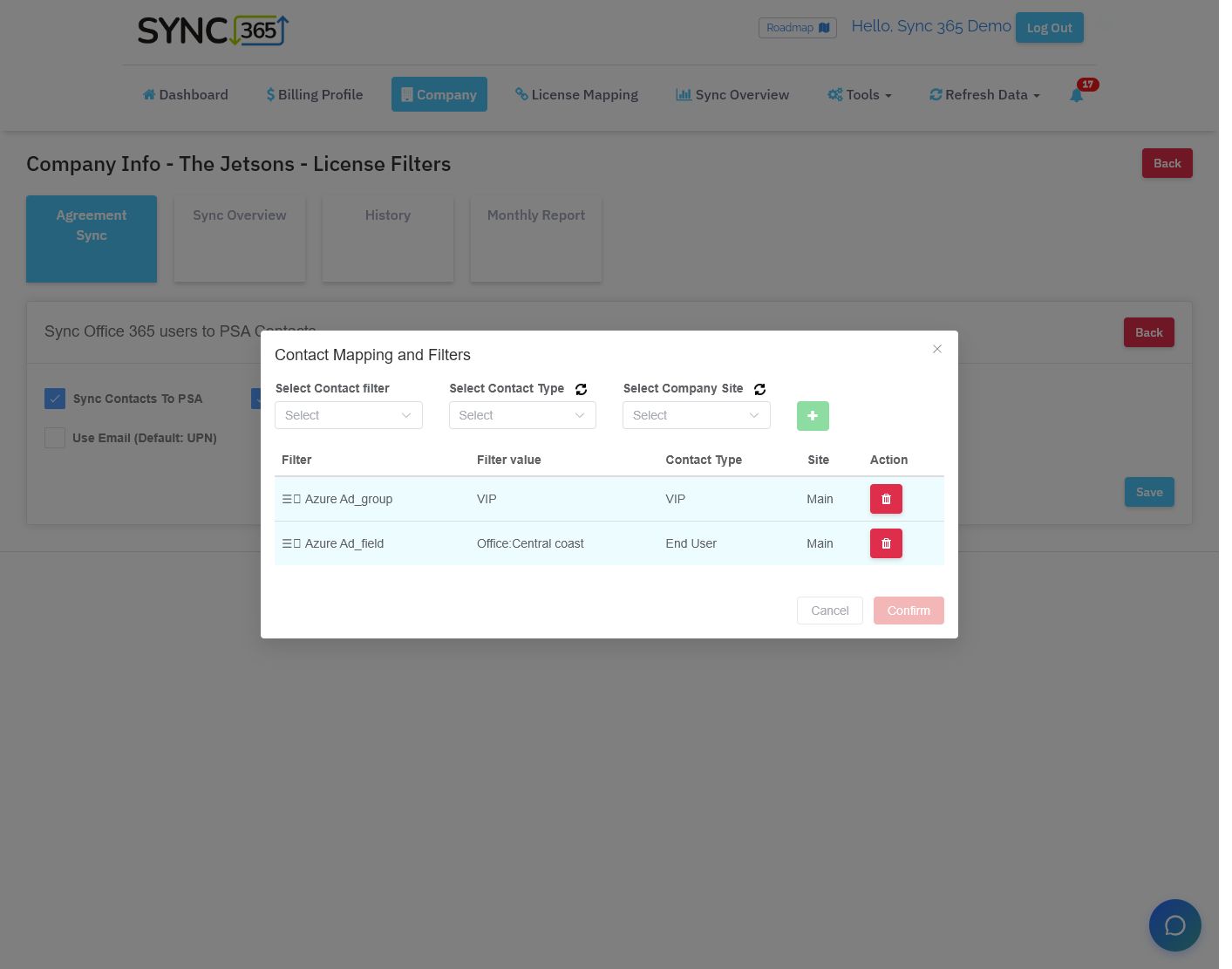
Contact mapping
Map Microsoft users to the right PSA contact context
Prioritised filters let the MSP route Entra groups and user fields to the right contact type and company site while controlling how existing contacts are updated.
See it on your data
Bill closer to what you deliver
We'll help show where your billing drifts — and how the rules can help close the gap.