
Calculated custom licence billing
Turn complex service rules into one billable quantity
Add and subtract trusted Microsoft, user and service counts to calculate the recurring quantity your MSP actually needs to bill.

The number you bill is not always stored in one system. Backup overage may be total protected mailboxes minus the users already included in a managed-service bundle. A security service may cover several Microsoft licence plans but count each person once. A customer minimum may need to apply after exclusions.
Calculated custom licences let the MSP express that logic directly. Add or subtract source quantities in the required order, apply the filters that define the count, and map the final result to the recurring PSA billing item.
Build the billable result, not another manual adjustment
A simple sync copies a source count. Calculated billing answers the harder question: what should this customer actually be charged after inclusions, overlaps and service rules are taken into account?
| Recurring service | Example calculation | Billing outcome |
|---|---|---|
| Mailbox backup overage | All protected mailboxes − managed users included in the bundle | Only the additional backup seats reach the overage line. |
| Email security overage | All protected mailboxes − included security seats | The customer is billed for the count above the agreed inclusion. |
| Service bundle | Business Premium users + selected enterprise-plan users, with duplicates removed | One repeatable bundle count can drive the related recurring service. |
| Split customer count | Active licensed users filtered by office, department, domain or custom attribute | The calculated quantity follows the customer structure the agreement needs. |
Use the right source for every term
A calculation can draw from a custom licence, a Microsoft licence, an individual subscription, all users or a fixed quantity. Depending on the source, the rule can use total, active or available counts and can be narrowed with user or licence filters.
Common filters include department, office, city, state, country, company, enabled status, domain, assigned licence and extension attributes. That makes the calculation useful when the billable count follows the customer’s business structure rather than the whole tenant.
Keep complex counts explainable
- Order the terms so additions and deductions follow the commercial rule.
- Exclude disabled users or count only active licensed users where the service requires it.
- Remove duplicate users when several licence groups overlap.
- Floor a negative calculated result at zero rather than creating an unintended negative quantity.
- Keep the source rows visible so finance and operations can understand how the result was produced.
Map the calculation into the PSA workflow
The calculated custom licence has its own Sync 365 billing profile. That profile maps the result to the appropriate product, service or item and supported billing destination in ConnectWise Manage, Autotask or HaloPSA.
The PSA remains the system of record and raises the invoice. Sync 365 owns the repeatable calculation that prepares the recurring quantity before supported PSA records are updated.
Why advanced custom billing helps an MSP stand out
Cleva Group’s public customer story captures the difference between basic licence sync and commercially useful billing automation: complex customers also need support, backup, security, minimums and customer-specific recurring rules to follow the right count.
“Everyone can do 365 licensing. It's the custom stuff I need.” — Chris F, Operations Director, Cleva Group
Read the Cleva Group storySee the DAS Health workflow
Calculated custom licence billing FAQ
How is this different from a normal custom licence?
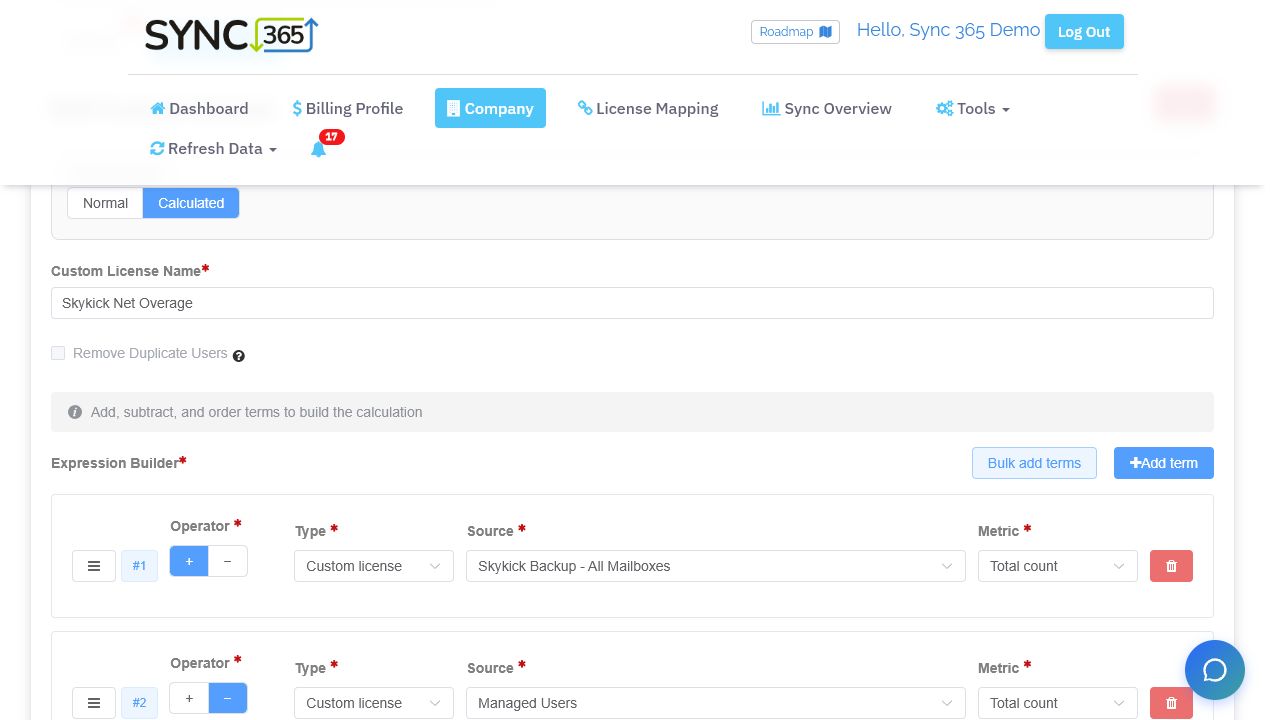
A normal custom licence can create a trusted count for one service or group. Calculated mode combines several source rows with addition and subtraction to produce a derived quantity such as an overage, bundle or net billable count.
Can calculated billing combine several Microsoft licence products?
Yes. A calculation can combine relevant Microsoft licence groups and, where appropriate, remove duplicate users so one person is not counted twice.
What happens if the deductions are larger than the additions?
The calculated quantity floors at zero, avoiding an unintended negative billing count.
Does Sync 365 create the customer invoice?
No. Sync 365 calculates and aligns the supported recurring quantity; the PSA remains responsible for invoicing.
Inside the expression builder
Build an overage rule from the services you already track
This live demo rule counts all SkyKick backup mailboxes, subtracts managed users, and leaves the overage quantity ready for its configured PSA billing item.
Complex billing walkthrough
Bring us the recurring service rule that lives in a spreadsheet
See how included quantities, overages, bundles and customer-specific calculations can become repeatable PSA billing logic.Bring one real customer example to a technical demo. We’ll identify the source counts, deductions, filters and billing destination, then show how the calculated result can fit your supported PSA workflow.