
Managed-user billing
Managed-user billing for MSP support and recurring services
Use the users you support, protect, back up, or manage to keep recurring service quantities aligned with supported PSA billing records.

MSPs often sell services per managed user, not per Microsoft SKU. A client may have Microsoft 365 licences, shared mailboxes, excluded users, included users, department rules, and different support or security services attached to the same headcount.
Managed-user billing helps the MSP bill the users it actually supports, protects, backs up, or manages.
Common managed-user billing scenarios
Use managed-user billing when recurring services depend on a user count:
- Managed support per supported user.
- Microsoft 365 backup per protected mailbox or user.
- Antivirus or EDR per managed endpoint/user relationship.
- Email security per protected user.
- Web filtering per managed user.
- Password or security tooling per user.
- Customer minimums for support or security packages.
- Department, location, or business-unit splits.
How Sync 365 counts billable managed users
Sync 365 helps turn the right user group into a billable count. That count can be filtered, mapped, and reviewed before it updates supported PSA records.
Controls can include included users, excluded users, minimum quantities, department filters, site or office filters, customer-specific rules, agreement-specific mappings, and review queues for changes.
See licence filters and split billing when one Microsoft tenant needs separate site, department or franchise counts synced to different PSA records or PSA companies. Use calculated custom billing when the managed-user count needs to be added to or subtracted from other service quantities.
Managed-user billing vs Microsoft licence billing
| Billing workflow | Best for | Example |
|---|---|---|
| Microsoft licence billing | Reconciling Microsoft SKUs to PSA agreement quantities | Business Premium quantity should match the PSA licence line |
| Managed-user billing | Billing services based on users the MSP supports or protects | Support, backup, antivirus, web filtering, or security services per managed user |
| Custom licence billing | Mapping one source count to several recurring PSA lines | One managed-user count updates support, backup, security, and customer minimum lines |
Keep user-based services aligned with PSA records
When managed-user counts change, the related PSA agreement lines can drift unless someone checks every line manually. Sync 365 makes those changes reviewable, so the billing team can keep recurring service quantities aligned before invoicing.
Managed-user billing FAQ
Is managed-user billing the same as Microsoft licence billing?
No. Microsoft licence billing reconciles Microsoft SKUs. Managed-user billing is for services priced around the users your MSP supports, protects, backs up, or manages.
Can managed-user counts drive several services?
Yes. A managed-user count can drive support, backup, antivirus, web filtering, security tooling, and other recurring PSA lines when those services share the same billing source.
Can Sync 365 handle minimums and exclusions?
Yes. Sync 365 supports billing profiles and custom rules such as minimum quantities, exclusions, departments, sites, and customer-specific logic.
Book a managed-user billing demoExplore custom licence billing
Managed-user rules
Bill the users you actually support
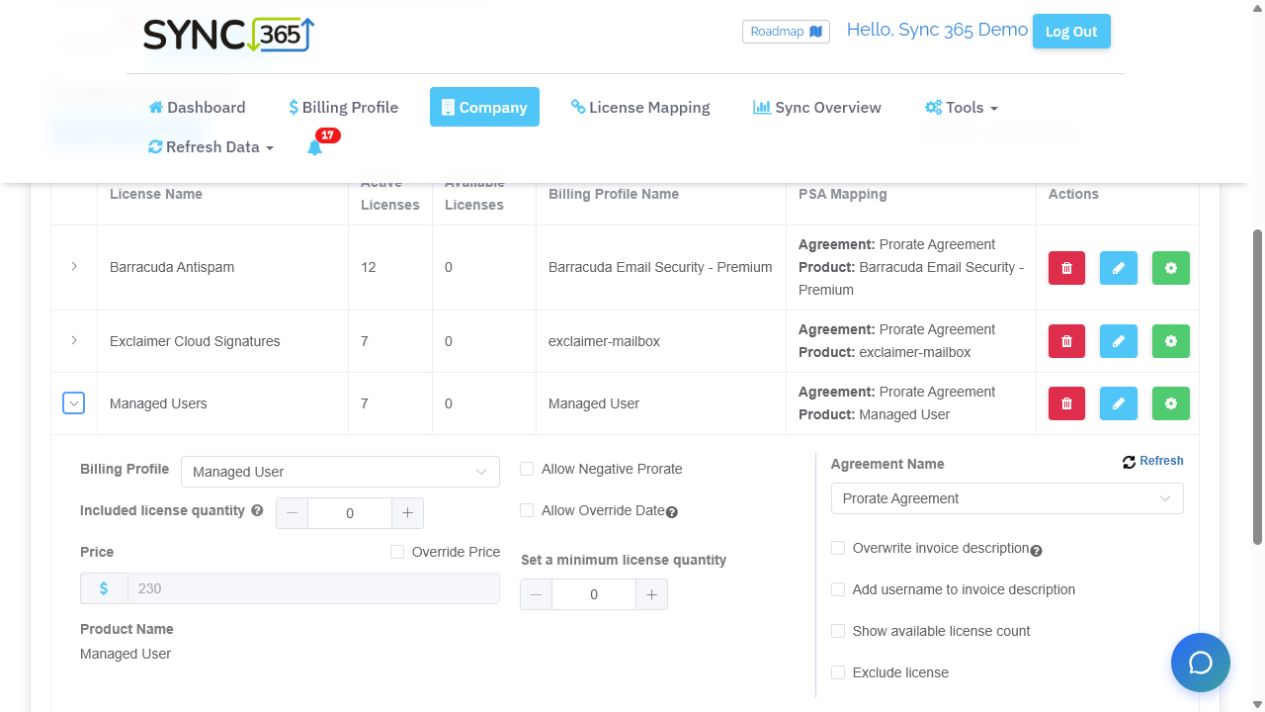
A calculated managed-user count can be mapped to a billing profile and agreement, with minimums, price overrides and exclusions controlled from the same view.
Billing workflow demo
Map the users you actually support to the services you bill
Show how supported users can drive managed support, security, backup, and other recurring service quantities.Bring your Microsoft licence, Azure consumption, managed-user, and recurring-service billing rules into a demo. We’ll compare them with your PSA agreement quantities, show where drift appears, and outline how Sync 365 would help keep the right lines aligned.