
How it works
How Sync 365 turns Microsoft billing data into PSA-ready records
Connect Microsoft and your PSA, map billing rules once, then let Sync 365 compare daily changes and keep supported PSA records up to date using your configured sync or approval controls — while the PSA remains the billing system of record.
Sync 365 is the CSP billing layer between Microsoft and your PSA. It does not replace the PSA invoice. It helps finance and operations teams turn Microsoft 365 licence counts, Azure charges, managed-user counts and custom billing rules into supported PSA agreement or contract updates.
Link Microsoft billing sources, customer tenants and supported PSA records.
Create licence mappings, billing profiles, filters, exclusions, minimums and customer rules.
Sync 365 applies your rules and compares the latest Microsoft, Azure and user-driven quantities with the PSA, calculating any updates needed.
Licence changes sync automatically where configured; Azure can follow your approval or auto-approval workflow.
1. Connect Microsoft, Azure and the PSA
Sync 365 connects Microsoft 365 licence data, Azure consumption sources and supported PSA platforms so the billing team is no longer reconciling from disconnected portals and spreadsheets. Common PSA paths include ConnectWise Manage, Autotask, and HaloPSA.
2. Map how your MSP actually bills
Billing profiles translate Microsoft and managed-user data into the quantities your MSP sells. That can include Microsoft 365 licences, support users, backup, antivirus, web filtering, security tools, customer minimums, department filters and agreement-specific rules.
This is where Sync 365 goes beyond basic licence sync. One trusted Microsoft or managed-user count can drive multiple related PSA lines, such as managed support, backup, antivirus and web filtering.
Automated licence mapping adds reusable Microsoft licence and commitment-term defaults, company- and filter-group billing destinations, and an approval mode configured separately for each company.
Licence filters and split billing preserve customer structure when one tenant needs separate site, department or franchise counts synced to different PSA records or PSA companies.
Subscription-level billing preserves separate Microsoft subscription rows when identical licence names need different terms, prices or PSA billing treatment. Calculated custom billing combines several source quantities into an overage, bundle or net recurring count.
3. Let Sync 365 compare daily changes automatically
Sync 365 applies your mappings and rules to licence adds, removals, reactivations, subscription changes, Azure usage and recurring quantity changes. It calculates the PSA updates needed before those changes become month-end invoice surprises.
Basic licence sync stops at the Microsoft count. Sync 365 compares that count with the PSA record you bill from and keeps it aligned according to your configured workflow.
4. Sync licence changes automatically where configured
Microsoft 365 licence sync is designed to keep supported PSA agreement or contract quantities aligned automatically according to your configured mappings and billing profiles. That automatic sync is a strength of the app: the billing team should not have to manually approve every licence count update when the rules are already trusted.
Exceptions, customer-specific mappings and billing logic still matter. Sync 365 gives the MSP a controlled workflow for the rules that decide what should be billed and where it should appear in the PSA.
See how automated licence mapping works when the MSP wants to configure those defaults once and choose whether mappings begin syncing automatically or are raised as pending for approval.
5. Review or auto-approve Azure consumption
Azure consumption has a different risk profile because usage amounts, markups, reserved instances, savings plans and customer billing preferences can change from month to month. Sync 365 can download Azure consumption, apply billing profiles and markup rules, then either hold billing periods for approval or auto-approve when consumption comes in, depending on how the MSP configures the workflow.
That gives MSPs a choice: review unusual Azure charges before posting, or use auto-approval for trusted recurring consumption workflows where the process should run with less month-end friction.
Contact sync keeps Microsoft 365 users aligned with the PSA
Contact sync brings Microsoft 365 user context closer to the PSA records used by service, finance and account teams. Prioritised filters can route Entra groups and user fields to the right PSA contact type and company site, while the MSP controls how existing contacts are updated.
This supports the same operating model as the billing workflows: Microsoft data changes, Sync 365 applies the configured rules, and the PSA remains the system of record. See how Microsoft 365 contact sync works.
Where to go next
- Sync 365 product overview for all four connected billing workflows and the best next page for each.
- Microsoft CSP licence billing for automatic licence reconciliation and proration.
- Automated licence mapping for reusable licence and term defaults with per-company approval controls.
- Licence filters and split billing for one tenant producing several billable counts for the PSA.
- Subscription-level billing for mixed commitment terms, prices or PSA billing items under one licence name.
- Custom licence billing for one count driving multiple recurring PSA lines.
- Calculated custom billing for overages, bundles and derived recurring quantities.
- Managed-user billing for support, backup, security and user-based service quantities.
- Azure consumption billing for automated consumption download, markup, approval and PSA sync.
- Microsoft 365 contact sync for prioritised user-to-contact mappings, PSA contact types and company sites.
- PSA integrations for the platforms Sync 365 commonly fits around.
The controlled workflow
From source data to PSA-ready billing lines
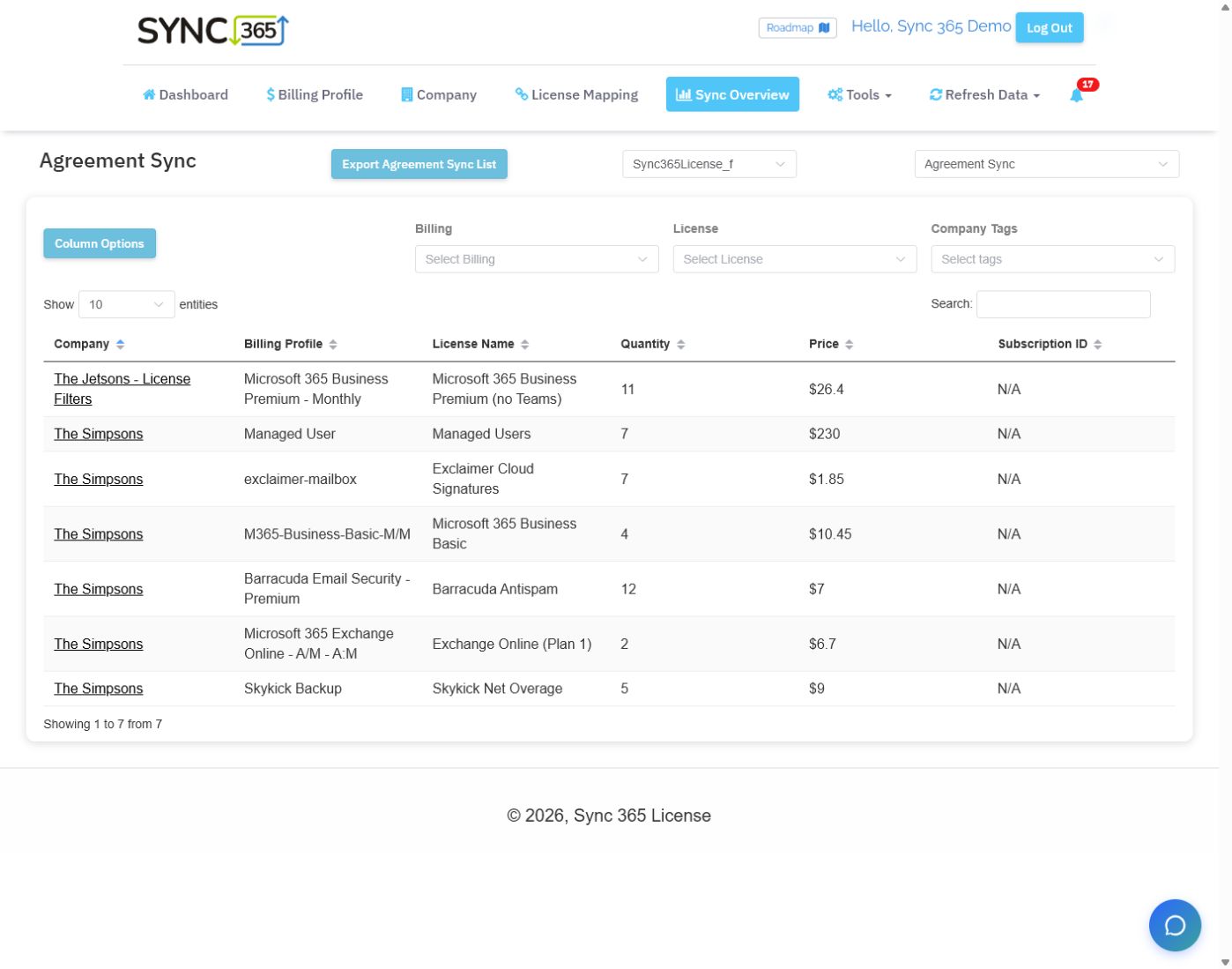
The Agreement Sync view brings customer, billing profile, licence, quantity and price into one filterable list.
See it on your data
Bill closer to what you deliver
We'll help show where your billing drifts — and how the rules can help close the gap.