
Microsoft 365 licence reconciliation
Microsoft 365 licence reconciliation for MSP billing
Find missed Microsoft 365 licence adds, removals, reactivations, SKU changes, proration, and agreement quantity drift before your PSA invoices the customer.

Microsoft billing changes constantly. Users are added, removed, reactivated, moved between SKUs, or changed mid-term. If those changes do not reach the PSA agreement before invoice time, the MSP carries the cost or handles the query later.
Sync 365 helps MSPs compare Microsoft 365 licence counts against supported PSA billing records, so billing differences can be reviewed before invoices are raised.
What Microsoft 365 licence reconciliation catches
- New licence adds not reflected on the PSA agreement.
- Removed licences still billing when they should be reviewed.
- Reactivated users with Microsoft cost but no matching PSA revenue.
- SKU changes that need agreement quantity or line review.
- NCE changes and billing commitments that need closer month-end control.
- Proration and mid-cycle changes that need explanation before invoicing.
How Sync 365 improves the billing workflow
- Pull Microsoft 365 licence data.
- Match licences to customer billing profiles, using automated licence mapping where reusable licence and term defaults are configured.
- Compare source counts with supported PSA agreement quantities.
- Flag differences, exceptions, and rules that need review.
- Approve updates before supported PSA records are changed.
Finance gets a cleaner month-end process. Operations get fewer manual checks. MSP owners get better visibility into missed billing revenue.
When licence counts should feed custom billing rules
A Microsoft 365 count is often the starting point, not the whole invoice. A Business Premium count might also drive managed support seats, Microsoft 365 backup seats, antivirus or EDR seats, email security, web filtering, customer minimums, and department or site splits.
Sync 365 can use Microsoft counts as part of a wider billing profile, so related recurring PSA lines stay aligned with the way the MSP actually sells the service.
For customers where one tenant must be separated by office, department, domain, group or franchise, explore licence filters and split billing.
When subscriptions with the same Microsoft licence name need different treatment because of commitment term, billing cycle, price or renewal date, use subscription-level billing to split or merge the underlying rows.
PSA records stay in control
Sync 365 does not replace PSA invoicing. The PSA remains the billing system of record. Sync 365 reconciles Microsoft source data, billing profiles, and rules, then updates supported PSA agreement or contract records after review.
This makes the billing change easier to explain before the invoice goes out.
Licence billing FAQ
Is this only for Microsoft 365 licences?
This page focuses on Microsoft 365 licence reconciliation, but Sync 365 also supports Azure consumption billing, managed-user billing, and custom recurring billing rules.
Can Sync 365 help with reactivated users?
Yes. Reactivated users are one of the common billing gaps Sync 365 is designed to surface, because Microsoft cost can resume before the PSA agreement line is corrected.
Does Sync 365 update invoices directly?
No. Sync 365 keeps the PSA as the billing system of record and works with supported PSA billing records before invoicing.
Start your 30-day free trialBook a licence reconciliation demo
Customer-level reconciliation
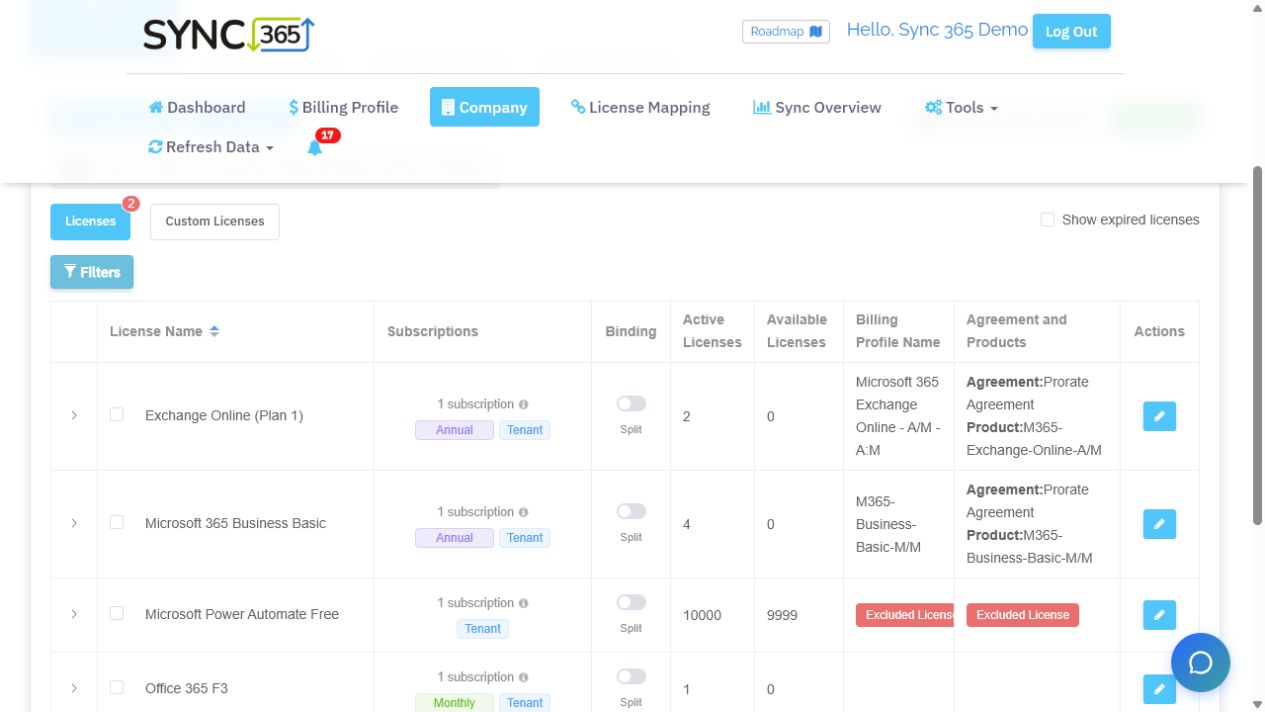
See Microsoft licence quantities and PSA mappings together
Recognisable Microsoft SKUs, subscription terms, active and available quantities, split or merge controls and PSA mappings stay visible in one customer workspace.
See it on your data
Bill closer to what you deliver
We'll help show where your billing drifts — and how the rules can help close the gap.