
Azure consumption billing
Automated Azure consumption billing for MSPs and CSPs
Download Azure consumption from Microsoft, apply billing profiles and markup, review or auto-approve billing periods, then sync supported PSA billing records.

Azure billing should not depend on monthly CSV handling. Sync 365's automated Azure billing workflow retrieves consumption data from Microsoft, applies the MSP's billing rules, and prepares Azure charges for supported PSA workflows.
What automated Azure billing does
Sync 365 automates the Azure billing flow so MSPs can move away from manually uploading files and rebuilding markup calculations each month. The workflow is designed for Microsoft CSP billing teams that need Azure usage, reserved instances, savings plans and PSA records to stay aligned.
Bill predictable Azure consumption in advance
Microsoft finalises actual Azure usage after the month ends, which can leave the MSP carrying the cost until the next invoice cycle. Azure Bill in Advance lets the MSP invoice an expected amount for the current month, then automatically carry the difference between estimated and actual usage into the next billing cycle.
Direct CSP and indirect CSP workflows
The automated Azure workflow varies by CSP model.
Direct CSP partners
- Sync 365 can discover Azure subscriptions from Microsoft Partner Center.
- Unmapped tenants can be surfaced so they can be mapped to PSA companies.
- The MSP can control which Azure products are included, such as Reserved Instances, Savings Plans, perpetual software or software subscriptions.
- The workflow can use finalised Microsoft bills or earlier unbilled consumption data depending on the billing preference.
Indirect CSP partners
- Azure tenants and subscription information are selected during company setup.
- The workflow depends on the required Azure permissions and subscription access.
- Vendor markup can be configured to account for distributor margins.
- Sync 365 can query Azure subscription data after the tenant and subscription mapping is in place.
Workflow overview
- Configure settings: Set billing profiles, vendor markup where needed, billing period preferences and Azure consumption download settings.
- Add or map companies: Connect Azure tenants and subscriptions to the right PSA companies.
- Apply billing rules: Attach billing profiles, markup rules, agreement names and reserved-instance pricing where required.
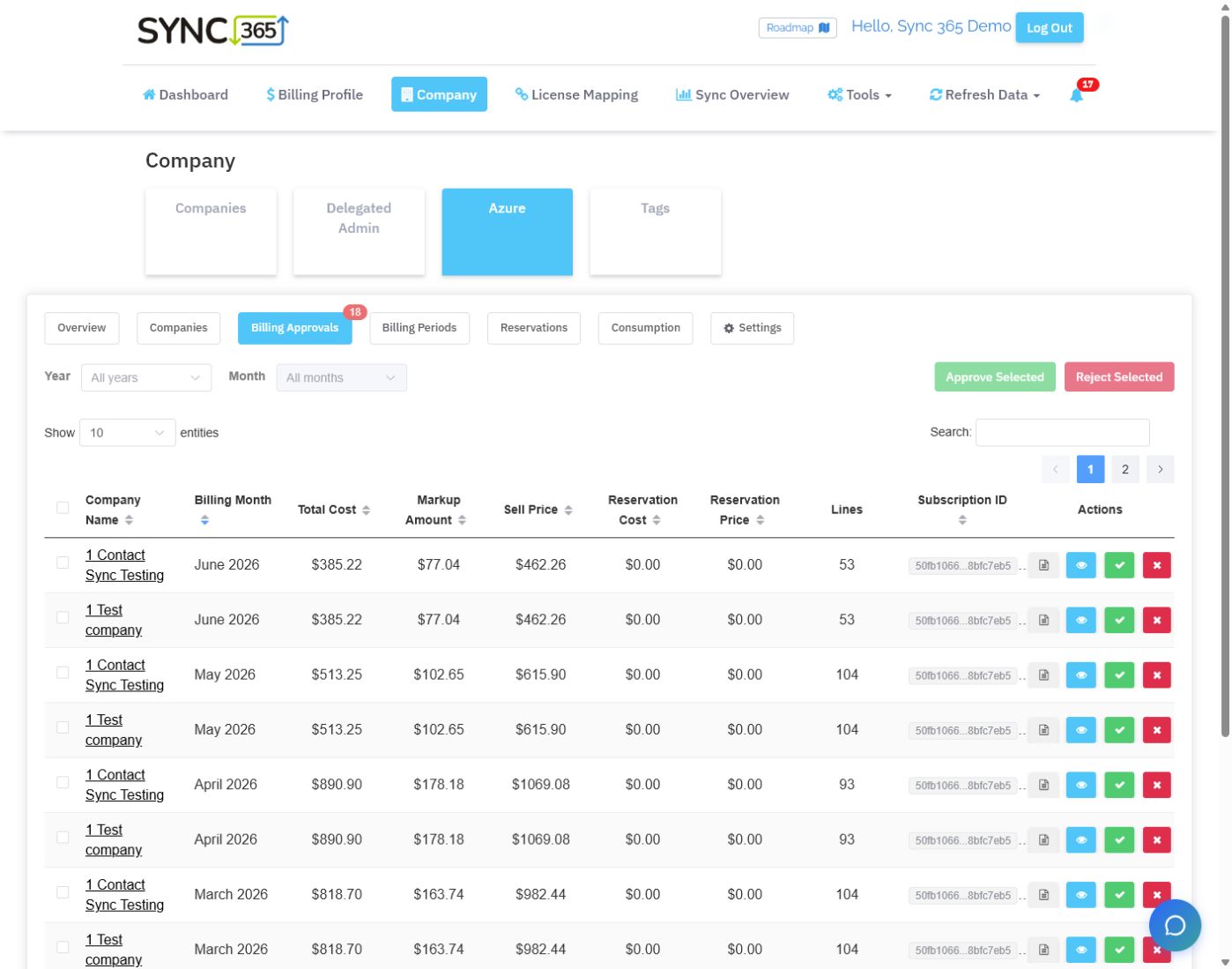
- Review billing periods: Check consumption totals, cost, markup, sell price, invoice descriptions and line items.
- Approve or auto-approve: Send selected billing periods to the PSA manually, or use auto-approval for trusted consumption workflows.
- Sync to the PSA: Approved Azure billing is queued for supported PSA sync so additions or contract records can be updated.
Why approval still matters for some Azure billing
Azure usage can spike, reserved-instance pricing can need attention, and unusual services can appear on a customer's consumption. For those workflows, reviewing billing periods before PSA sync gives finance teams a control point.
For stable accounts or lower-risk workflows, auto-approval can remove a manual step after consumption is downloaded and processed. The goal is not one universal process — it is giving the MSP the right level of control for each Azure billing workflow.
Common review points
- Preview invoice descriptions before sending them to the PSA.
- View Azure line items when consumption looks higher than expected.
- Recalculate markup after billing profile or reserved-instance pricing changes.
- Check pending billing periods before billing cutoff dates.
- Verify company mappings and PSA sync status after approval.
Bring Azure into the same billing layer as licences
Azure billing is only one part of the Microsoft billing picture. Sync 365 also supports Microsoft 365 licence reconciliation, managed-user billing, custom recurring billing, contact sync, minimums, exclusions and PSA-aligned billing logic.
Azure billing control
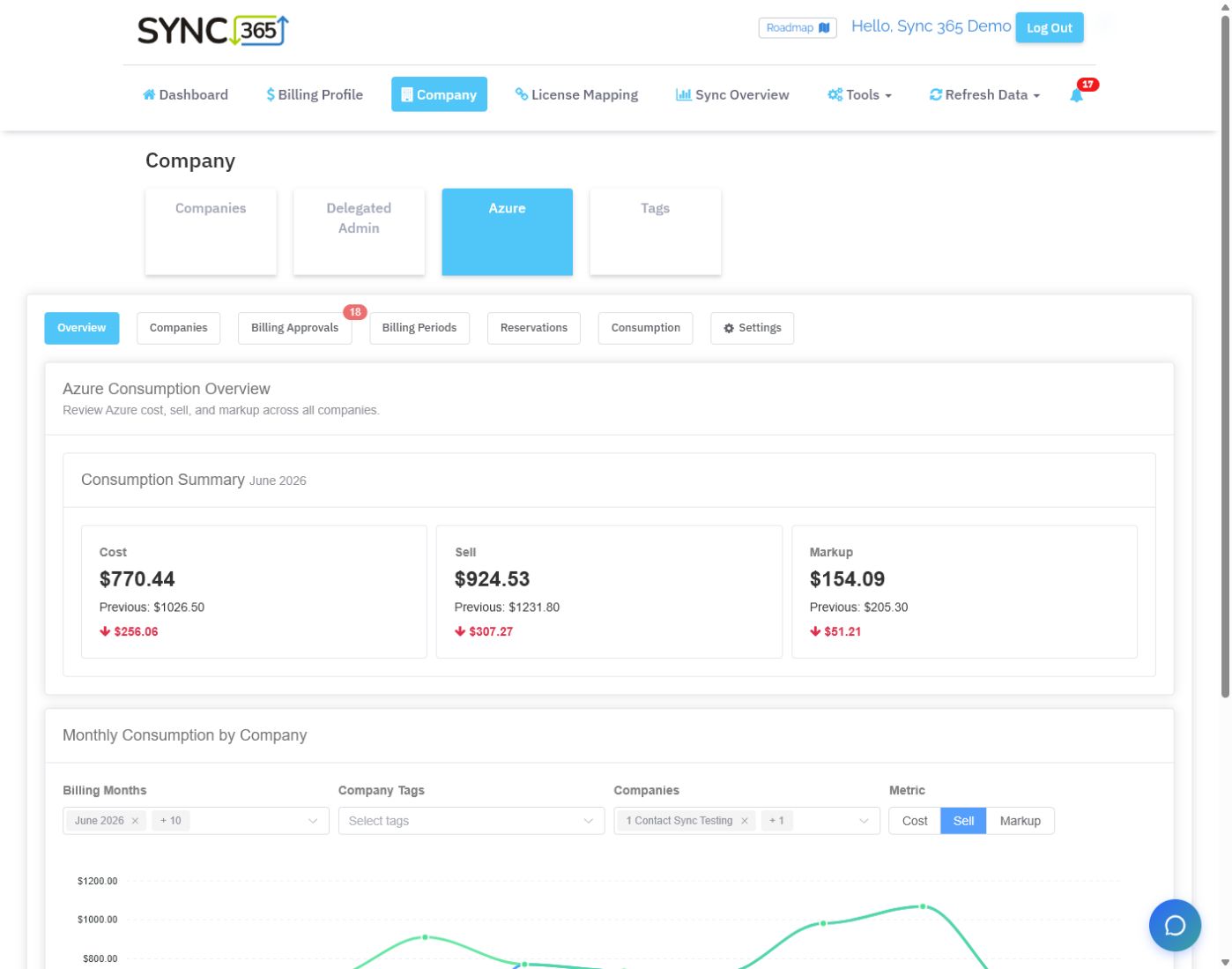
See Azure margin and approvals before PSA posting
Cost, markup and sell price are visible across the estate, with a separate approval queue for billing periods that need a finance review.
Billing workflow demo
Stop rebuilding Azure billing in spreadsheets
Bring Azure consumption into the same billing workflow as your PSA agreement quantities.Bring your Microsoft licence, Azure consumption, managed-user, and recurring-service billing rules into a demo. We’ll compare them with your PSA agreement quantities, show where drift appears, and outline how Sync 365 would help keep the right lines aligned.