
Azure Bill in Advance
Bill Azure consumption in advance without losing sight of actual usage
Invoice an agreed estimate for the current month, then automatically apply the difference between estimated and actual Azure consumption in the next billing cycle.

Azure consumption is normally billed in arrears because Microsoft finalises actual usage after the month ends. That can leave an MSP carrying the customer’s Azure cost until the following invoice cycle.
Sync 365’s Bill in Advance feature lets the MSP set an expected monthly amount and bill it upfront. When Microsoft provides the actual consumption, Sync 365 calculates the difference and applies the correction to the next billing cycle. The customer continues paying in advance while the running total stays aligned with actual usage over time.
How Azure Bill in Advance works
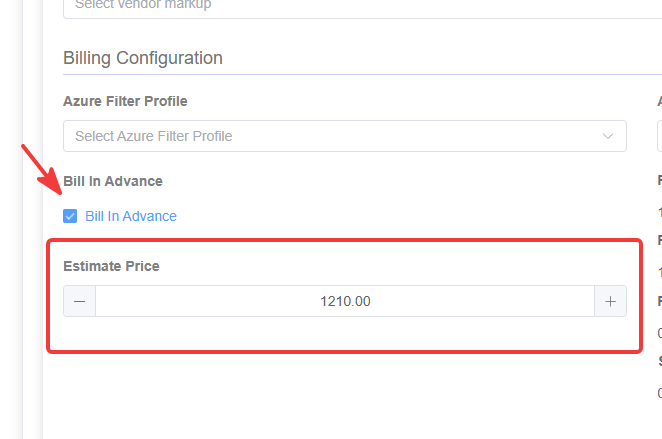
Enable Bill in Advance for the Azure company and enter the expected monthly Azure spend.
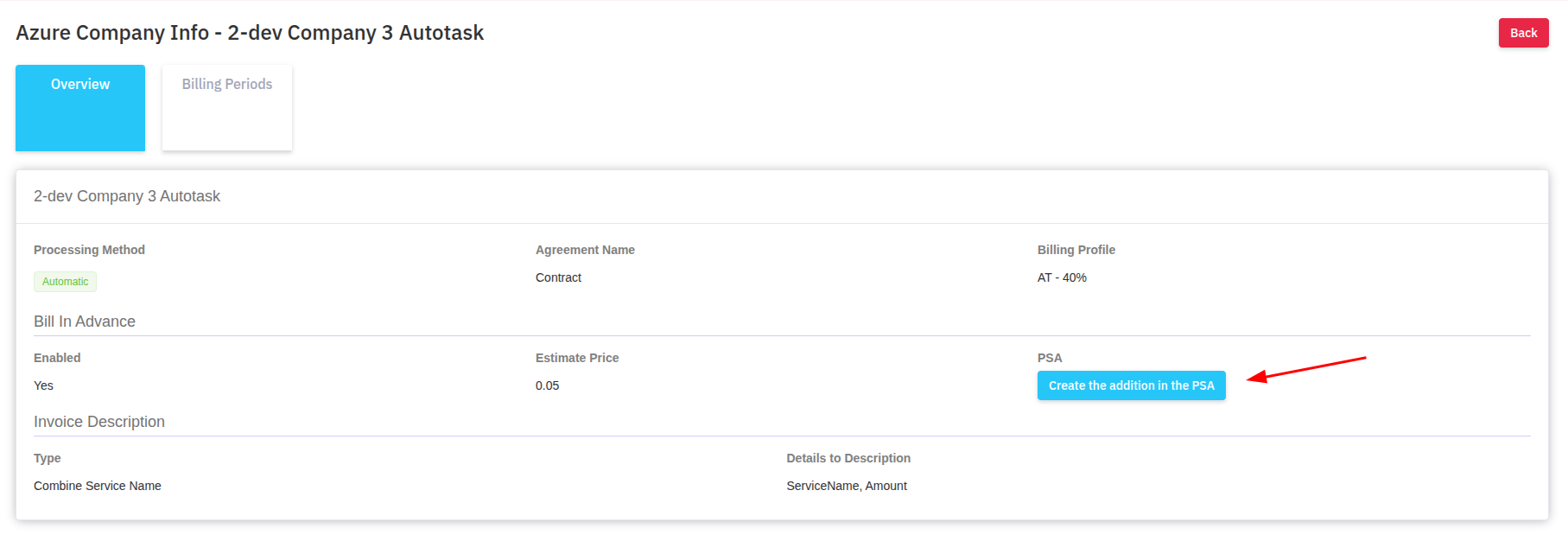
Create the supported PSA addition or contract record so the estimate can be invoiced upfront.
After month end, Microsoft finalises the customer’s actual Azure consumption.
Sync 365 carries the positive or negative variance into the next billing cycle.
A worked Azure billing example
An MSP estimates that a customer will consume £1,000 of Azure in January and bills that amount upfront. Microsoft later finalises January usage at £1,150, leaving a £150 under-estimate.
In February, the customer is billed the new £1,000 estimate plus the £150 January adjustment. If February’s actual usage finishes at £950, the resulting £50 over-estimate becomes a credit in March.
| Usage month | Estimate billed upfront | Actual Azure usage | Next-cycle adjustment |
|---|---|---|---|
| January | £1,000 | £1,150 | Add £150 in February |
| February | £1,000 | £950 | Credit £50 in March |
| March | £1,000 | £1,020 | Add £20 in April |
This is an illustrative billing flow, not a promised cash-flow result. Actual amounts depend on the estimate, Microsoft consumption data, markup, invoicing dates and PSA configuration.
Why MSPs use advance Azure billing
- Reduce the delay in recovering Azure costs: invoice the customer for the current month instead of waiting for final usage to become available.
- Protect working capital: avoid funding a predictable month of Azure consumption before the customer is billed.
- Keep corrections systematic: calculate over- and under-estimates from actual Microsoft usage rather than tracking them in a separate spreadsheet.
- Make the billing model explainable: show the current estimate and the previous month’s adjustment as a repeatable rolling process.
Best suited to predictable Azure customers
Bill in Advance is most useful for managed Azure environments with relatively stable monthly consumption and an agreed approach to estimates and adjustments. Larger usage swings can create larger credits or additions in the next cycle, so the estimate should be commercially sensible and the customer should understand how the reconciliation works.
Moving from arrears to advance billing
A customer already billed in arrears may need a carefully timed transition. Moving to advance billing can temporarily place a final arrears amount and a new advance estimate close together. Review the invoice timing, customer communication and existing PSA record before creating the advance addition.
If Bill in Advance is later disabled, Sync 365 stops estimating future usage and returns the customer to the standard arrears flow for future billing periods. The exact transition depends on the PSA workflow and invoicing timing already in place.
Azure Bill in Advance FAQ
Does the estimate replace actual Azure consumption?
No. The estimate changes when the MSP recovers the expected cost. Microsoft’s finalised consumption remains the basis for the correction applied in the following billing cycle.
What happens when actual usage is higher than the estimate?
Sync 365 calculates the under-estimate and adds the difference to the next billing cycle alongside the new month’s estimated amount.
What happens when actual usage is lower than the estimate?
The over-estimate becomes a negative adjustment or credit in the next billing cycle, keeping the rolling total aligned with actual usage.
Should the estimate be changed every month?
The initial estimate establishes the rolling workflow. Sync 365 uses actual usage to calculate ongoing adjustments. Review the configuration before changing the estimate so the active proration flow is not disrupted.
Does Sync 365 replace PSA invoicing?
No. Sync 365 applies the configured Azure billing logic and updates supported PSA records. The PSA remains the billing system of record and produces the customer invoice.
Book an Azure billing demoExplore all Azure billing features
Inside the Bill in Advance workflow
Set the estimate, then create the supported PSA addition
Enable Bill in Advance for the Azure company, enter the initial estimate and use the configured PSA workflow to start advance billing.
Azure cash-flow walkthrough
Recover Azure costs sooner while keeping billing aligned to actual usage
See how an advance estimate and automatic next-cycle adjustment can fit your Azure customers, billing dates and supported PSA workflow.Bring one stable Azure customer and the way you bill them today. We’ll show the estimate, adjustment and PSA steps using your workflow as the reference point.