
Subscription-level licence billing
Split or merge Microsoft subscriptions before PSA billing
Keep subscriptions separate when identical Microsoft licence names hide different terms, prices or PSA billing rules, and merge them when the treatment is genuinely the same.

The same Microsoft licence name can hide subscriptions with different commercial treatment. One may be monthly, another annual commitment billed monthly, and another annual commitment billed annually. They may also have different prices, renewal dates or PSA products, services or items.
If every subscription is flattened into one licence quantity, those differences disappear. Sync 365 lets the MSP split a licence into its underlying subscription rows, or merge those rows when they can safely share one billing rule.
Choose the billing granularity that matches the commercial rule
| Control | Use it when | Result |
|---|---|---|
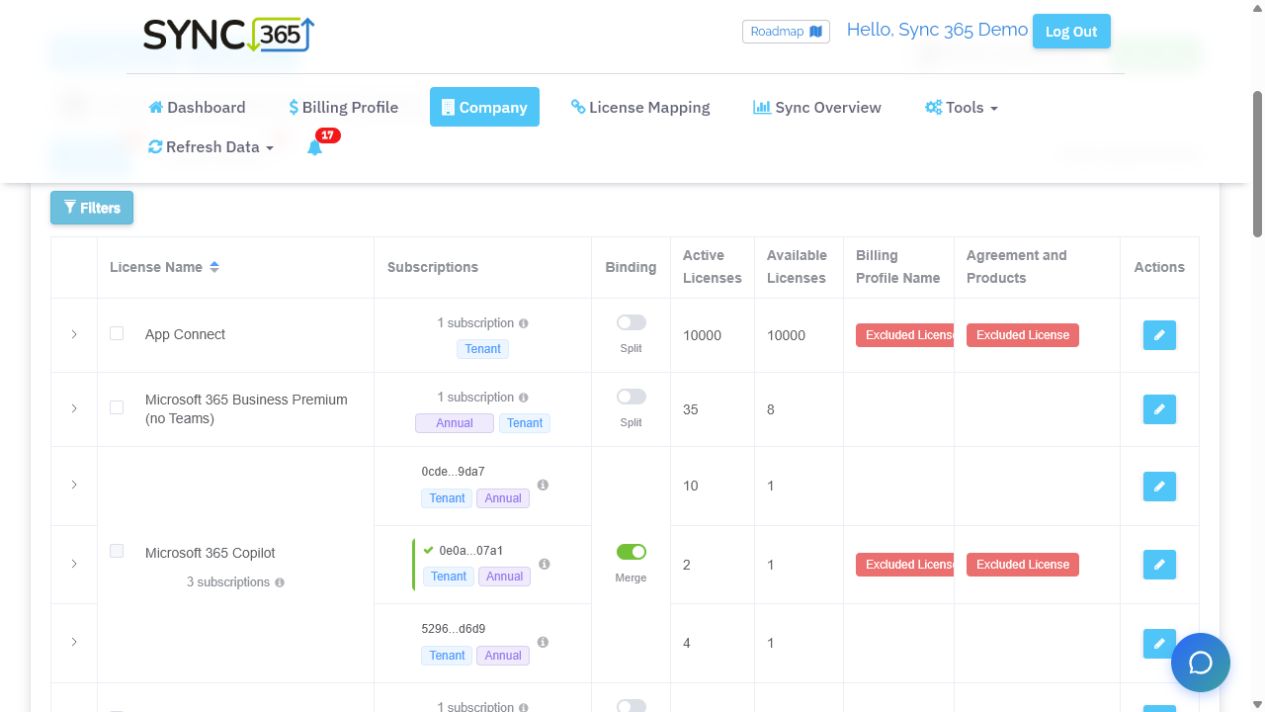
| Split | Subscriptions under the same licence product have different terms, billing cycles, prices, renewal dates or PSA billing items. | Each subscription row can receive its own billing profile and supported PSA mapping. |
| Merge | All subscriptions under that licence product should use the same price, billing profile and PSA destination. | Sync 365 presents one combined licence quantity for simpler reconciliation. |
Separate monthly and annual treatment without renaming the licence
An MSP may sell the same Microsoft licence product under several commitment and billing combinations. Splitting the licence lets an annual commitment billed monthly use a different Sync 365 billing profile from a monthly commitment or an annual upfront purchase.
That separation can carry through to the PSA product, service or item, the customer billing destination, the price and the invoice description. The Microsoft name stays recognisable while the commercial differences remain explicit.
Use licence view by default, then split only where needed
The default company view can be set to Licences or Subscriptions. A licence-first view keeps most customers compact, while Split exposes individual subscription rows only for the products that need separate treatment. A subscription-first view suits MSPs that routinely manage at that level.
Automated licence mapping can use the subscription-level information where separate mapping is required, alongside the reusable term, company and filter-group defaults configured by the MSP.
Keep invoice evidence close to the billing rule
Where configured, subscription term and end-date information can be included in the PSA invoice description. This gives finance and account teams clearer evidence when a customer asks why two rows with the same Microsoft licence name have different treatment.
The PSA remains the system of record. Sync 365 preserves the granularity and applies the configured billing logic before supported PSA records are updated.
Change views without creating duplicate billing
Moving from a combined licence row to split subscriptions changes the mapping structure. Before enabling the new rows, review and remove any old PSA additions that would overlap with them. After the mappings are correct, verify the next sync and confirm that each subscription reaches only its intended destination.
This controlled migration matters most on live agreements: the purpose of Split is clearer billing, not a second copy of the same quantity.
Identify licence products with different commitments, billing cycles, prices or PSA destinations.
Expose the underlying subscription rows and their Microsoft term information.
Apply the correct billing profile, price and PSA billing item to each subscription.
Combine rows again when one consistent treatment genuinely applies to every subscription.
Subscription-level billing FAQ
Is this the old Bill by Subscription ID feature?
Split and Merge are the current controls for that billing need. Split exposes individual subscription rows; Merge combines them when licence-level treatment is appropriate.
Should every Microsoft licence be split?
No. Split only where the underlying subscriptions need different commercial treatment. Keep or merge the licence-level row when one billing profile, price and destination apply to all of them.
Can separate subscription rows use different PSA billing items?
Yes. Each separated row can be mapped through the billing profile that matches its term, price and intended PSA product, service or item.
Does this replace automated licence mapping?
No. Split and Merge decide the level at which a product is billed. Automated licence mapping applies reusable defaults to create and route mappings at the appropriate level.
Book a subscription billing demoRead the Split and Merge guide
Split and merge controls
Keep the Microsoft subscription detail the PSA billing rule needs
The demo workspace shows three Microsoft 365 Copilot subscriptions kept visible beneath one licence product, with a Merge control available when those rows should share one treatment.
NCE billing walkthrough
Do not let one licence name flatten different commercial terms
See how mixed commitments, billing cycles, prices and renewal dates can remain visible before PSA quantities are updated.Bring a customer with two or more subscriptions for the same Microsoft licence product. We’ll show where Split or Merge fits, how the billing profiles remain explainable, and how to change granularity without creating duplicate PSA billing.