
Licence filters and split billing
Split Microsoft 365 billing by site, department or franchise
Turn one Microsoft tenant into separate billable counts for each site, department, franchise or billing entity, then sync each count to the relevant PSA record.

One Microsoft tenant does not always mean one billing entity, one invoice or one billable count. Larger and more complex customers may operate across offices, departments, legal entities, cost centres or franchises while sharing the same Microsoft 365 tenant.
Sync 365 licence filters preserve that structure. Instead of flattening the tenant into one count, the MSP can create separate filtered counts and sync each one to the relevant PSA record.
Build filters around the customer’s real structure
Filters use Microsoft and Entra data your customer already maintains. That gives the MSP a repeatable way to decide which users and licence assignments belong in each billable count.
| Customer structure | Useful filter | Billing outcome |
|---|---|---|
| Multiple offices or sites | Office, City, State or Country | Create a separate licence count for each location and sync it to the relevant PSA record. |
| Departments or cost centres | Department, Company Name or Custom Attribute | Keep departmental quantities separate even when everyone shares one tenant. |
| Franchises or operating entities | Domain, Entra ID Group, location or customer-specific attribute | Sync each filtered count to the relevant PSA record or PSA company. |
| Included or non-billable licences | Exclude matching users | Keep internal, bundled or centrally funded users out of the customer’s billable count. |
One tenant can sync several counts to the PSA
Add more than one filter when separate counts from the same tenant need to sync to different PSA records. For example, London and Manchester offices can share Microsoft 365 administration while their licence quantities sync to the relevant PSA record for each office.
The same approach works for departments, branches, franchises and other business units. The PSA still owns invoicing; Sync 365 prepares and aligns each billing count before that invoice process.
Each filtered licence count can be mapped through its billing profile to the relevant PSA record. Automated licence mapping also lets the MSP select a default PSA record for each filter group, so new mappings for that count follow the intended route.
Start with the Microsoft licences or users that the billing rule should evaluate.
Use location, department, domain, group or custom data to include or exclude the right people.
Use the billing profile to sync each filtered licence count to the relevant PSA record.
When needed, link the tenant to each PSA company separately and apply a unique filter to every link.
Support separate PSA companies without duplicating the tenant
When business units need to exist as separate companies in the PSA, Sync 365 can link the same Microsoft tenant to more than one PSA company. Each link needs its own unique licence filter so the counts remain distinct.
Filter design matters: overlapping filters can count the same licence twice or create billing errors. A technical walkthrough is useful when customer attributes are inconsistent or several filters need to be mutually exclusive.
Use filtered counts across related recurring services
Standard licence filters split Microsoft licence quantities; they do not by themselves define the count for managed services. Custom licence billing and managed-user billing can separately create the filtered or calculated counts used for recurring services.
When the same office, department or franchise structure also affects managed support, backup, security or email-filtering charges, those customer attributes can be reflected in the separately configured recurring-service rules.
See franchise-style billing working in practice
IT Global used Sync 365 to support a franchise-style customer where one central enterprise tenant had to feed many office and franchise billing records in Autotask. Microsoft and Entra data helped identify the right users, while filters and custom licence rules produced the count for each office.
“There’s no way we would be able to service a customer like that manually.” — Sean Stuart, Operations Manager, IT Global
Read the IT Global storySee more customer stories
Complexity matters more than licence volume
This capability is especially useful for larger MSPs, but size is not the only signal. A smaller MSP supporting one multi-site, multi-entity or franchise customer can face the same billing complexity as a much larger provider.
The best fit is any workflow where a tenant-wide count hides the customer structure that the PSA needs to bill.
Licence filters and split billing FAQ
Which attributes can Sync 365 use for licence filters?
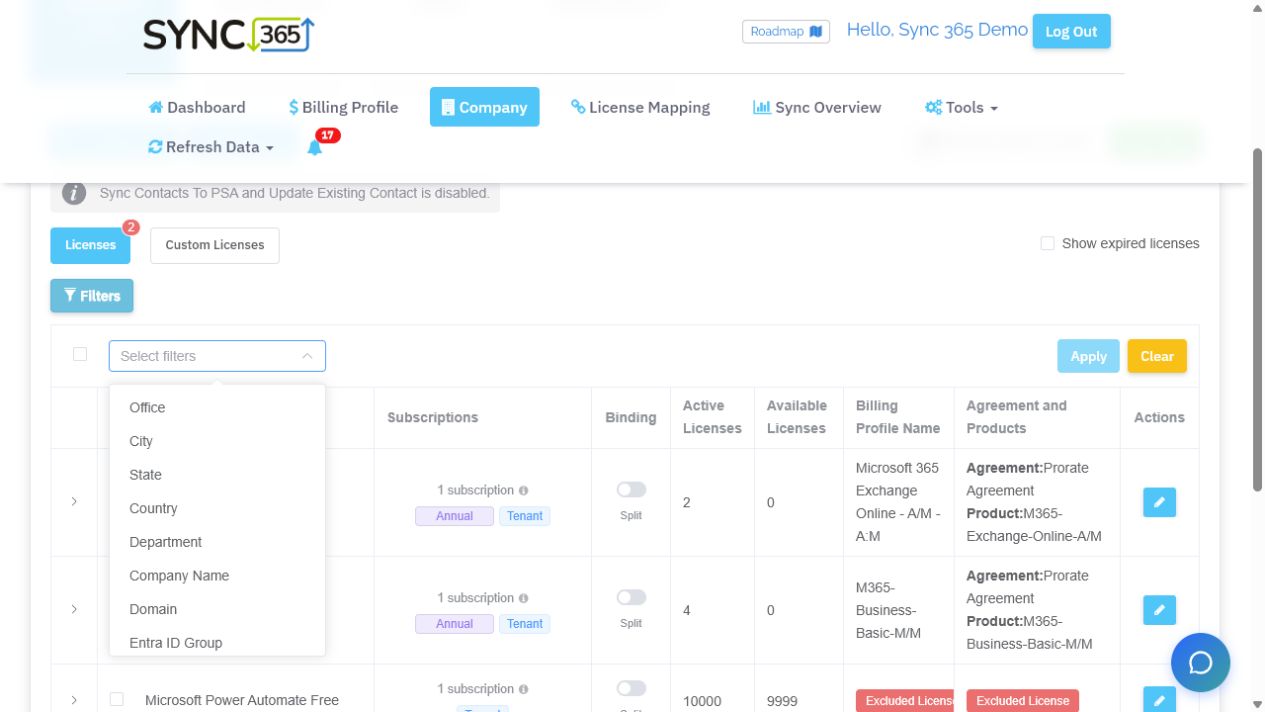
Available filter choices include Office, City, State, Country, Department, Company Name, Domain, Entra ID Group and Custom Attribute. The source data needs to be maintained consistently in Microsoft 365 or Entra ID for the filter to remain reliable.
Can one Microsoft tenant sync to several PSA records?
Yes. Additional filters can create separate counts from the same tenant and sync each one to the relevant PSA record.
Can one Microsoft tenant link to several PSA companies?
Yes. The tenant can be linked to more than one PSA company when each link uses a unique filter. Overlapping filters should be avoided because the separate company records do not evaluate one another’s counts.
Is this the same as automated licence mapping?
No. Licence filters decide which users or licences belong in each billable count. Automated licence mapping applies reusable Microsoft licence and commitment-term defaults, including the relevant PSA record for each company and filter group. Automatic or pending approval is configured separately for each company.
Does Sync 365 create the invoice?
No. The PSA remains the billing system of record. Sync 365 calculates and aligns supported billing quantities so the PSA invoice process can follow the customer’s real structure.
Book an advanced billing walkthroughRead the filter setup guide
Attribute-based licence filtering
Define each billable count before it reaches the PSA
Filter Microsoft licence counts by customer attributes such as office, department, country, domain, Entra ID group or a custom attribute.
Advanced billing walkthrough
Bring us the customer that does not fit one tenant, one count
Test a multi-site, multi-agreement, franchise or split-billing scenario against the way your MSP actually works.We’ll help you identify the right Microsoft or Entra attributes, separate the billable counts, and show how each result can sync to the relevant PSA record while your PSA remains the system of record.