Sync 365 vs CloudOlive

Sync 365 vs CloudOlive: Microsoft billing automation or multivendor invoice control?

Choose CloudOlive to reconcile supplier invoices across the stack. Choose Sync 365 when Microsoft and Entra data should continuously determine the recurring quantities sent to your PSA.

  • AutoMap for matching new Microsoft subscriptions
  • Custom and calculated recurring quantities
  • Location, department and split-billing filters

What Sync 365 does differently

Automate the billing logic between Microsoft and your PSA

A licence count is only the starting point. Sync 365 maps new subscriptions, builds the quantities your MSP sells, and routes each result to the right supported PSA record.

Major differentiator

AutoMap new Microsoft subscriptions

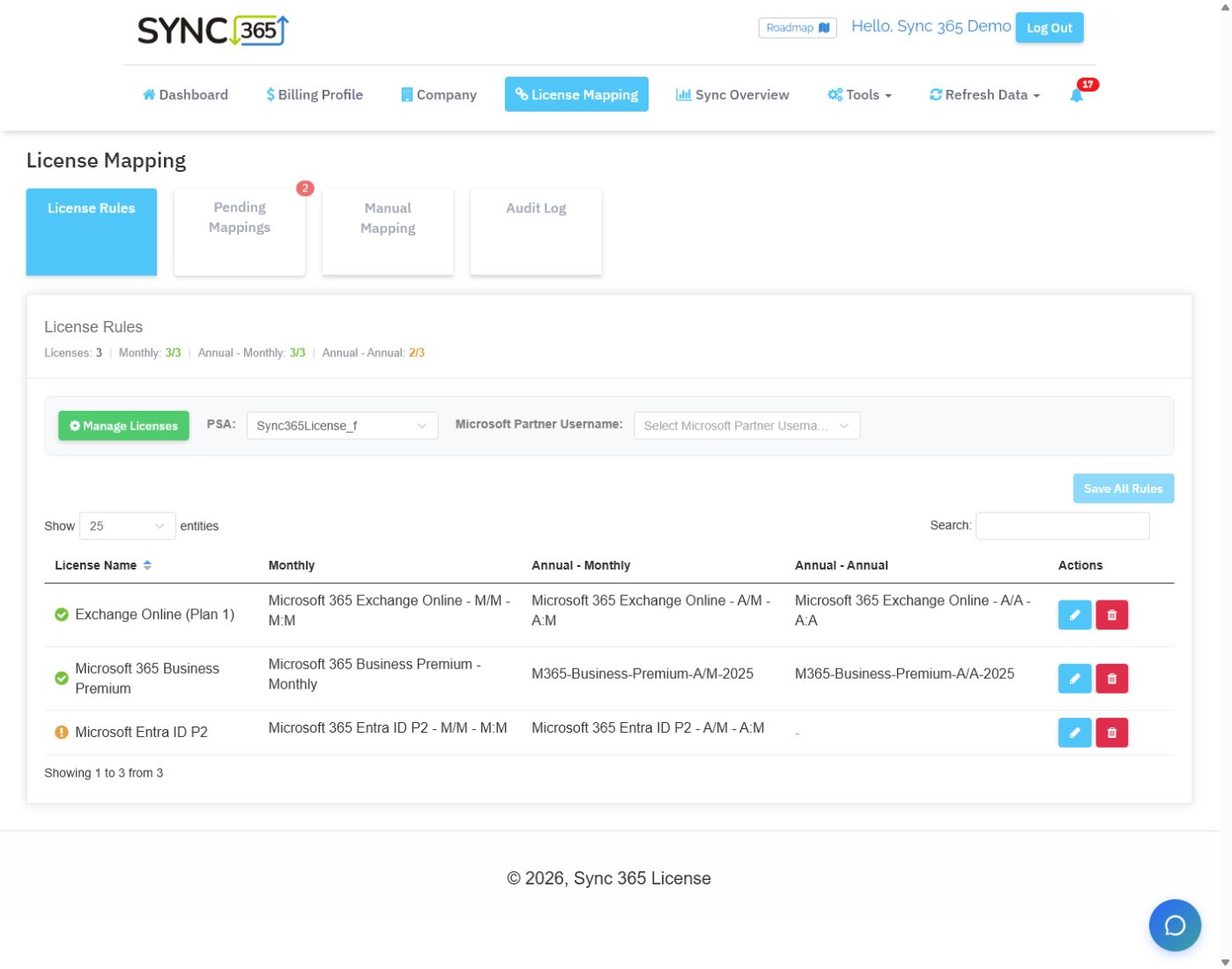
Set the licence, commitment-term, billing-profile and PSA destination rules once. When matching subscriptions appear, AutoMap can apply those rules automatically or queue them for approval.

  • Separate defaults for monthly and annual Microsoft commitment terms
  • Company and filter-group PSA destinations
  • Automatic mapping for trusted setups or pending approval for exceptions
Explore AutoMap
Sync 365 AutoMap settings with separate Microsoft licence term and PSA destination rules

Custom licences

Bill the recurring services around the Microsoft licence

Create the active-user or managed-user count your MSP actually sells, then use it across related support, backup, security and filtering lines in the PSA.

Explore custom licence billing
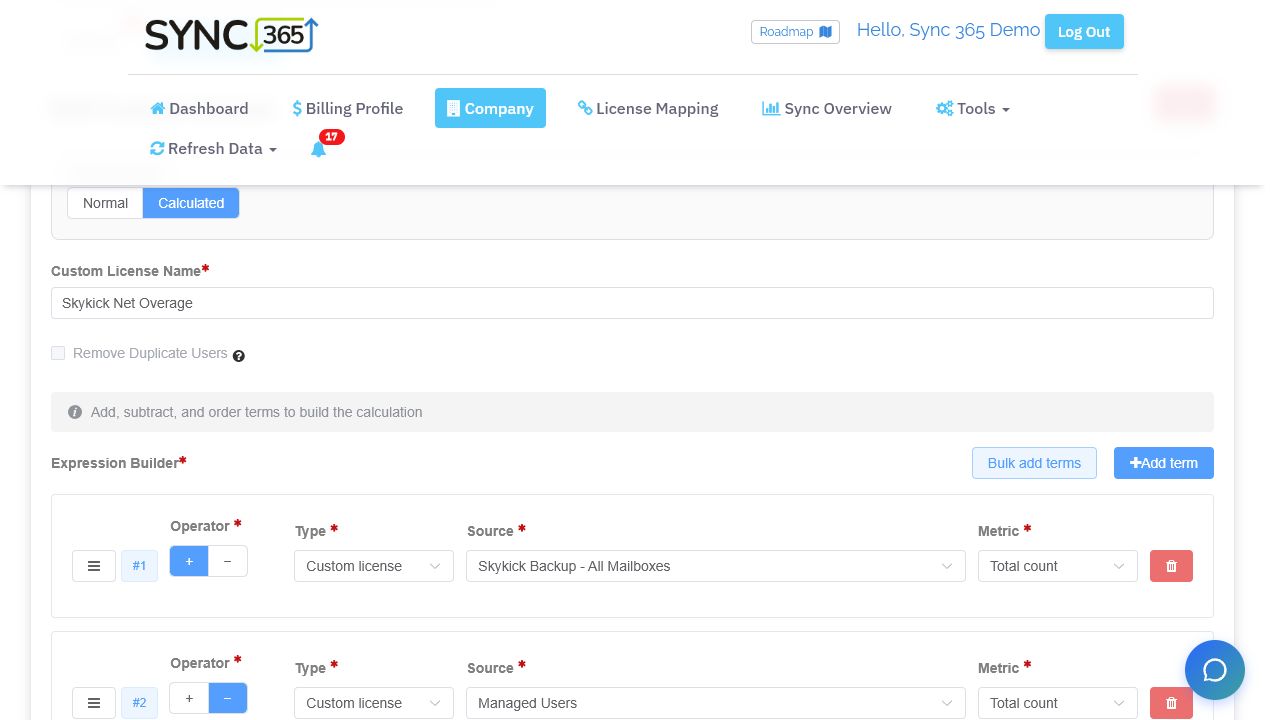
Sync 365 calculated custom licence builder adding and subtracting recurring service quantities

Calculated custom licences

Turn several source counts into one explainable quantity

Add and subtract Microsoft licences, subscriptions, users, custom licences or fixed quantities to model bundles, included seats and overages before the result reaches the PSA.

Explore calculated billing
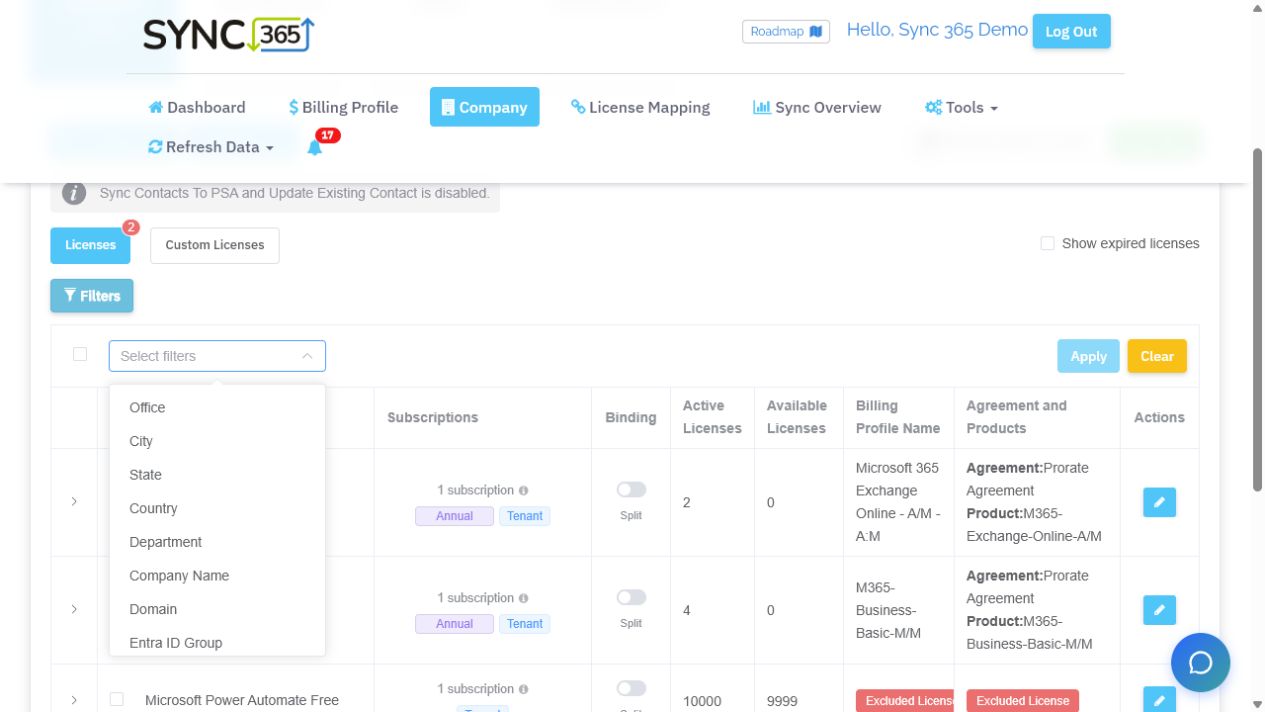
Sync 365 licence filters for office, city, state, country, department, company, domain and Entra ID group

Filters and split billing

Bill by location, department, group or billing entity

Split one Microsoft tenant into separate billable populations using office, city, state, country, department, company, domain, Entra ID group or custom attributes.

Explore filters and split billing

At a glance

Sync 365 and CloudOlive at a glance

Compare the jobs that determine billing accuracy: new-subscription mapping, custom and calculated quantities, split-tenant rules, Azure controls, and ownership of the final PSA record.

A source-attributed workflow comparison of Sync 365 and CloudOlive, reviewed 2026-08-28.
What mattersAutomates repeat billing workSync 365CloudOliveWhy it matters
Primary billing jobMicrosoft billing automationA focused Microsoft billing layer for licences, Azure, managed users, contacts, and custom recurring services while the supported PSA remains the invoicing system of record.[6][2][5]Vendor reconciliation controlCloudOlive: Vendor-wide invoice and PSA-contract reconciliation, anomaly detection, and management review.[7][9]Start with the operational problem each product is designed to own before comparing individual features.
Source-data collectionConnected Microsoft dataSync 365 starts from connected Microsoft and Entra data used by its licence, Azure, filtering, custom, and calculated-quantity workflows.[1][5][2][3][4]Mixed-source data ingestionCloudOlive documents a mixed collection model using APIs, CSVs, vendor portals, and guided uploads. For file-based suppliers, the team must obtain and load the current invoice or usage data before reconciliation can begin.[10]Reconciliation can automate the comparison after ingestion while still leaving a recurring collection and upload task for sources that do not connect directly.
New subscription mappingReusable subscription rulesAutoMap applies reusable Microsoft licence and commitment-term rules to matching new subscriptions, routing each to the configured billing profile and PSA destination automatically or pending review.[1]Supplier-to-contract mappingCloudOlive ingests supplier data and maps it against client contracts. Its reviewed public material emphasises controlled reconciliation rather than reusable Microsoft commitment-term rules for matching new subscriptions.[7][8]A reusable mapping rule reduces the chance that a newly appearing subscription waits for another manual setup step before billing cutoff.
Custom recurring servicesUser-driven service billingA configured Microsoft or managed-user count can keep support, backup, antivirus, security, filtering, and other related recurring PSA lines aligned.[2]Bundle reconciliationCloudOlive documents bundles and multi-tenancy reconciliation across supplier and PSA data. Sync 365 should be compared when a Microsoft or active-user count must drive several non-vendor recurring lines.[7][8]MSPs often sell a service bundle around each user, not only the underlying Microsoft licence.
Calculated quantities and overageCalculated billing rulesCalculated custom licences add and subtract Microsoft licences, subscriptions, users, custom licences, or fixed values to produce bundles, included-seat deductions, and overage quantities.[3]Invoice-to-contract comparisonCloudOlive focuses on comparing invoice and contract quantities. The reviewed public material does not describe a Microsoft/user expression builder that adds and subtracts counts for included seats, overage, or deduplication.[7][8]The correct quantity may be a formula—such as protected mailboxes minus users already included in the bundle—not a copied vendor count.
Location, department, and split billingAttribute-based split billingOffice, city, state, country, department, company, domain, Entra group, and custom attributes can split one tenant into separate billable populations and PSA records.[4]Complex vendor mappingsCloudOlive supports complex vendor mappings and multi-tenancies. The reviewed material does not describe deriving PSA quantities directly from office, department, domain, Entra group, or custom user attributes.[7][8]One Microsoft tenant can represent several sites, departments, franchises, cost centres, or legal billing entities.
Azure consumption workflowAzure review and postingAzure consumption can move through billing profiles, markup, billing-period review, approval or configured auto-approval, and supported PSA posting.[5]Invoice-led Azure controlCloudOlive can reconcile supplier data across the vendor stack; buyers should compare that invoice-led control with Sync 365’s Microsoft-to-PSA Azure consumption, markup, and approval workflow.[7]Azure comparison should include data timing, markup, period review, approval, exception handling, and the final PSA record—not only ingestion.
PSA ownership and scopeMulti-PSA billing layerSync 365 supports ConnectWise Manage, Autotask PSA, and HaloPSA workflows while the PSA remains responsible for invoices.[6]Operator-controlled reconciliationCloudOlive integrates with ConnectWise and Autotask as a broad reconciliation control layer and deliberately gives operators control over sensitive billing decisions.[9][8]Clear system ownership prevents overlapping automations and keeps finance confident about which record becomes the invoice.

Beyond one-to-one sync

Build the quantity your MSP actually bills

Start with Microsoft, managed-user or recurring-service data. Apply the commercial rule. Keep the related PSA lines aligned without rebuilding the logic in a spreadsheet each month.

Billing sources

Start with the count the service actually uses

  • Active managed-user counts
  • Protected mailbox counts
  • Microsoft licence and subscription counts
  • Counts filtered by department, site or franchise

Sync 365 billing rules

Build the billable quantity

  • Minimums and exclusions
  • Add or subtract source counts
  • Remove duplicate users
  • Customer-specific mappings

Automated PSA billing

  • Managed support
  • Microsoft 365 backup and overage
  • Antivirus, EDR or email security
  • Web filtering and other recurring services
Managed-service bundle10 active managed users can keep 10 managed support, backup, antivirus and web filtering quantities aligned in the PSA.
Mailbox backup overage13 protected mailboxes minus 10 included users becomes a 3-seat backup overage that Sync 365 can calculate and sync to the PSA.

Workflow differences

What changes in day-to-day billing

These are the practical differences to test with your own customer data—not a generic feature-score exercise.

Map the rule once—not every new subscription

AutoMap is term-aware, destination-aware, and designed to keep applying the rule after initial setup.

With Sync 365

Configure monthly and annual Microsoft commitment-term defaults, the Sync 365 billing profile, the company or filter-group PSA destination, and automatic or pending approval. Matching new subscriptions can then follow that route.[1]

With CloudOlive

CloudOlive ingests supplier data and maps it against client contracts. Its reviewed public material emphasises controlled reconciliation rather than reusable Microsoft commitment-term rules for matching new subscriptions.[7][8]

Why it matters

The useful distinction is not whether a product can sync a count. It is whether new Microsoft subscriptions inherit the right commercial and PSA-routing decisions without rebuilding the mapping.

Bill more than the Microsoft licence

Turn the trusted user or licence count into the support, backup, security, and filtering lines the MSP actually sells.

With Sync 365

Custom licences can use managed users, filtered licences, minimums, exclusions, and customer rules. One configured count can drive several related recurring items through their billing profiles into supported PSA records.[2]

With CloudOlive

CloudOlive documents bundles and multi-tenancy reconciliation across supplier and PSA data. Sync 365 should be compared when a Microsoft or active-user count must drive several non-vendor recurring lines.[7][8]

Why it matters

A Microsoft seat count can be correct while the surrounding managed-service invoice is still wrong. Keeping related lines tied to one reviewed quantity reduces that drift.

Build the exact quantity, including bundles and overage

Use ordered additions and deductions when the billable number does not exist in any single source system.

With Sync 365

Calculated custom licences can combine Microsoft licences, subscriptions, all users, custom licences, and fixed quantities. Rules can apply filters, configured duplicate removal, included-seat deductions, and a zero floor before mapping the result to the PSA.[3]

With CloudOlive

CloudOlive focuses on comparing invoice and contract quantities. The reviewed public material does not describe a Microsoft/user expression builder that adds and subtracts counts for included seats, overage, or deduplication.[7][8]

Why it matters

Finance gets an explainable recurring result for rules that otherwise tend to live in spreadsheet formulas, custom scripts, or month-end adjustments.

Filtering that changes the bill—not only the view

Keep one tenant while producing separate location, department, franchise, group, or entity-specific billing populations.

With Sync 365

Sync 365 can include or exclude users by Microsoft and Entra attributes, map each filtered population to the relevant PSA record, and use a separate AutoMap destination for each filter group.[4][1]

With CloudOlive

CloudOlive supports complex vendor mappings and multi-tenancies. The reviewed material does not describe deriving PSA quantities directly from office, department, domain, Entra group, or custom user attributes.[7][8]

Why it matters

The tenant-wide total is often wrong for a multi-site or multi-entity agreement. Billing populations should reflect the customer structure that finance actually invoices.

Built around real MSP billing

The difficult billing scenarios are the point

Sync 365 customer stories show custom recurring rules and split-tenant billing working in live MSP operations.

Custom recurring billing

“Everyone can do 365 licensing. It’s the custom stuff I need.”

Chris F, Operations Director · Cleva Group

Read the Cleva Group story

One tenant, many billing records

“There’s no way we would be able to service a customer like that manually.”

Sean Stuart, Operations Manager · IT Global

Read the IT Global story

Customer-specific examples, not typical or guaranteed results.

Best fit

Which option fits your MSP: Sync 365 or CloudOlive?

Choose around the system that should own the billing logic, the source data that determines quantity, and the amount of mapping or custom engineering your team wants to maintain.

Choose Sync 365 when

Choose Sync 365 to automate repeat Microsoft billing work

Sync 365 fits when Microsoft and Entra data must produce customer-specific recurring quantities and the MSP wants ConnectWise, Autotask, or HaloPSA to remain responsible for invoicing.[1][2][3][4][6]

  • Matching new Microsoft subscriptions should inherit reusable term and destination rules.
  • Managed-user services, bundles, overages, minimums, or exclusions change the billable quantity.
  • One tenant needs separate location, department, franchise, group, or entity billing records.

Choose the alternative when

Choose CloudOlive for multivendor invoice control

CloudOlive fits an MSP that wants to compare supplier invoices against PSA contracts across a wide vendor portfolio, keep finance in control of exceptions, and manage each supplier's documented ingestion route.[7][8][10]

  • Supplier-invoice reconciliation is the primary billing problem.
  • Your MSP needs broad vendor coverage and anomaly review.
  • Your team can obtain and load current invoice or usage files for file-based suppliers before each reconciliation cycle.
  • Operator approval is preferred for sensitive contract changes.

Use a real customer in the demo

Questions worth testing before you choose

Use one real customer to compare Sync 365 with CloudOlive: a new annual Microsoft subscription, a managed-user bundle, an overage calculation, one filtered department or site, and the final PSA record. Follow every mapping, review, and exception step.

  1. 01When a matching new Microsoft subscription appears, what does CloudOlive configure automatically and what must an operator map?
  2. 02Can CloudOlive calculate the exact bundle or overage quantity from several Microsoft, user, custom, and fixed counts?
  3. 03Can CloudOlive split one tenant by location, department, domain, group, or custom attribute into the required PSA records?
  4. 04For each supplier in CloudOlive, is billing data pulled automatically through an API, exported from a portal, or manually uploaded—and who owns that recurring step?
  5. 05Which system owns exception review and the final invoice when CloudOlive is connected?

How Sync 365 fits

From Microsoft data to PSA billing records

The PSA stays in control of invoicing. Sync 365 owns the reusable mapping, quantity and review logic that prepares supported billing records.

  1. 01

    Connect the source data

    Bring Microsoft 365, Azure, managed-user and supported PSA data into one billing workflow.

  2. 02

    Apply the commercial rules

    Use AutoMap, billing profiles, minimums, exclusions, filters and calculated custom quantities.

  3. 03

    Review the exceptions

    Check pending mappings, calculated quantities, billing changes and configured Azure approvals.

  4. 04

    Align the PSA

    Update supported PSA billing records while the PSA remains the invoicing system of record.

Frequently asked questions

Sync 365 and CloudOlive

What is the main difference between Sync 365 and CloudOlive?

CloudOlive is designed primarily for vendor-wide invoice and PSA-contract reconciliation, anomaly detection, and management review. Sync 365 focuses on turning Microsoft and Entra data into mapped, filtered, custom, or calculated quantities while a supported PSA remains the invoicing system of record.[1][2][3][4][6][7][9]

Does CloudOlive require manual supplier-invoice uploads?

Not for every source. CloudOlive's own guide describes a mixed model in which vendor data may be gathered through APIs, CSVs, or portals, and its onboarding includes a guided upload process. For file-based suppliers, an operator must obtain and load the current invoice or usage data before CloudOlive can reconcile it; buyers should confirm the ingestion route and cadence for each supplier.[10]

Does CloudOlive document the same AutoMap workflow as Sync 365?

In the public CloudOlive material reviewed, we did not find the same documented combination of Microsoft commitment-term rules, Sync 365 billing-profile routing, PSA destination routing, and per-company automatic or pending approval. That is a documentation comparison, not proof that an unpublished capability does not exist; verify it directly.[1][7][8]

How do Sync 365 and CloudOlive handle complex recurring quantities?

Sync 365 provides custom and calculated licence workflows for managed-user services, minimums, filters, additions, deductions, bundles, and overage. CloudOlive should be tested with the same real customer rule so buyers can see where the source data, calculation, review, and PSA update live.[2][3][4][7][8]

Can an MSP use Sync 365 alongside CloudOlive?

CloudOlive and Sync 365 address different starting points: supplier invoices versus Microsoft and Entra billing data. Some MSPs may evaluate both layers rather than treat them as direct substitutes. Whichever design you choose, document the system of record and ensure two automations do not update the same customer quantity.[6][7][9]

Compare with your own billing data

See how much repeat billing work Sync 365 can automate

Use one real Microsoft tenant, one new subscription, one custom quantity, and one PSA agreement to compare Sync 365 with CloudOlive. See the mapping, calculation, review, and update path end to end.

Methodology and sourcesReviewed

How we compared Sync 365 with CloudOlive

This buyer guide compares documented workflows rather than awarding a generic feature score. A capability not found in the public CloudOlive material reviewed is labelled as such, not presented as proof that no private or newer capability exists. Product information was reviewed on. Confirm plan, region, integration and workflow details with each vendor before buying.

  1. Sync 365 AutoMap automated Microsoft licence mappingSync 365
  2. Sync 365 custom licence billingSync 365
  3. Sync 365 calculated custom licence billingSync 365
  4. Sync 365 licence filters and split billingSync 365
  5. Sync 365 Azure consumption billingSync 365
  6. Sync 365 supported PSA integrationsSync 365
  7. CloudOlive platform overviewCloudOlive
  8. CloudOlive product fact sheetCloudOlive
  9. CloudOlive company and integration overviewCloudOlive
  10. CloudOlive Getting Started with Billing Automation guideCloudOlive