
Microsoft CSP subscription billing breaks not when a subscription is cancelled, but when it sits in one of the in-between states — Suspended, Expired, EST, or Pending Cancel — that a PSA agreement line cannot represent. This article breaks down what those non-active states actually mean for your costs and your invoices, and how to build a state-aware reconciliation model that catches the mismatch before it becomes a credit note or a silent margin loss.
Key takeaways
- A suspended subscription doesn’t stop Microsoft billing you — the partner keeps paying while the customer loses access.
- The free grace period is changing; from Q2 2026 expired subscriptions can move into a paid Extended Service Term at a premium unless cancellation is handled correctly.
- Most margin leakage is structural, not human error — it’s a mismatch between Microsoft’s six-state model and the PSA’s binary active/inactive switch.
- Non-active states like Expired and Disabled don’t even show on the main Partner Center page, creating an operational blind spot.
- The fix is exception-driven reconciliation that flags state changes before invoices go out, not month-end spreadsheet checks.
The Month-End Surprise No One Planned For
It’s invoice day. The billing admin pulls the PSA agreement list, sees 47 subscriptions that looked active last cycle, and sends the invoices.
Three days later, two enterprise customers query credits — they were told their services were suspended last week. After a partner-side reconciliation, the truth lands: Microsoft was still billing the MSP for those suspended seats, while the MSP had already credited the customers.
That’s a full double loss. The cost was absorbed with no downstream recovery, because suspension does not pause partner billing in NCE.
Meanwhile, a third customer had a subscription in an expired/grace state that the PSA still showed as active. The MSP invoiced for it, Microsoft had stopped billing at term end, and the customer got a credit — pure revenue handed back.
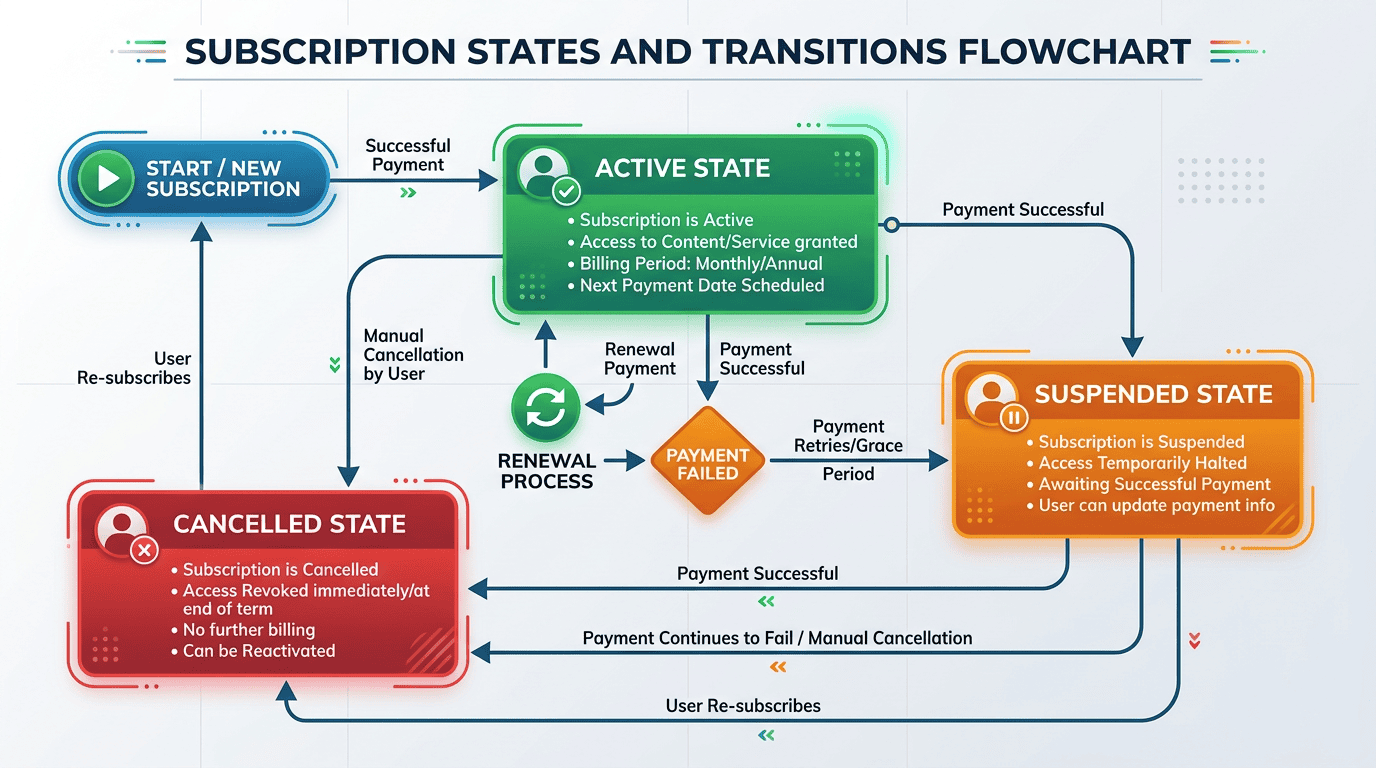
The thesis is simple: Microsoft CSP subscription status billing breaks down when state is treated as a binary active/cancelled decision. The non-active states sit in an ambiguous zone standard PSA models can’t represent, and that ambiguity is the engine of margin leakage and credit notes.
A few definitions to keep concrete throughout:
- Subscription state: the lifecycle label Microsoft assigns in Partner Center.
- PSA agreement line: the recurring billing line in ConnectWise Manage, Autotask, or HaloPSA that generates the customer invoice.
- Margin leakage: cost absorbed by the MSP with no matching revenue recovery.
- Credit note: the corrective document that reverses overbilled revenue.
The scale matters. CSP partners typically run 12–18% gross licence margins, and billing gaps are estimated to silently erode 3–8% of CSP MRR at scale — treat that figure as illustrative, not audited.
On a sizeable Microsoft 365 book, a small systematic billing error can quickly become a material monthly margin problem. That pressure worsens once EST cost uplifts hit subscriptions the PSA has not repriced.
This is systemic, not careless. It’s a structural mismatch between Microsoft’s rich state model and the PSA’s single switch.
What These States Actually Mean — And Why They Are Not ‘Not Cancelled’
Microsoft CSP NCE subscriptions have six lifecycle states: Active, Suspended, Expired, Disabled, Canceled, and Deleted. None of them map cleanly to a PSA’s “active or inactive” toggle.
Suspended is the most counterintuitive. The partner manually suspends — usually for non-payment — and the customer loses service access while admins keep data access. Critically, the suspended subscription billing MSP reality is that Microsoft keeps charging the partner the whole time, and for legacy subscriptions that can run up to 90 days before auto-deletion.
Expired (grace) happens when auto-renew is off and the term ends. Service stays on for 30 days, and the partner generally isn’t billed — the “free grace window.” But that window is closing.
From Q2 2026 (subject to current Partner Center guidance), Microsoft replaces free grace with the Extended Service Term (EST). Instead of 30 free days, the subscription continues at roughly the monthly rate plus 3% — effectively about 23% above the base annual price — and it runs indefinitely until you formally cancel or renew.
Here’s the trap: from 19 January 2026, setting autoRenew = false via API defaults to EST unless an explicit cancel-at-term-end flag is set. Any workflow that maps “pending cancel” to “toggle auto-renew off” will silently push subscriptions into grace period subscription billing at a premium rather than ending them.
Disabled follows Expired: 90 days, no user access, admin data export only, partner not billed. After that, the subscription is Deleted and non-recoverable.
Pending Cancellation isn’t a native Microsoft label — it’s the operational condition after a cancel-at-term-end is scheduled. Service and billing continue until the scheduled date, but a PSA that marks the customer “churned” early causes pending cancellation subscription billing errors through underbilling.
Canceled only allows a prorated refund within the 7-day window. Outside it, NCE subscriptions can’t be cancelled mid-term — you pay through term end. A 90-day post-cancellation window allows data restoration if the same product is repurchased.
A conceptual state-to-billing map:
- Active: user access yes, partner billed yes, customer billed yes.
- Suspended: user access no, partner billed YES, customer billing disputed — suspension ≠ billing pause.
- Expired (legacy grace): user access yes, partner generally not billed, 30-day window now being replaced.
- EST: user access yes, partner billed at ~23% premium, customer must be repriced or you absorb it.
- Disabled: user access no, partner not billed, admin data access only.
- Pending Cancel: user access yes, partner billed until cancel date — don’t close the PSA early.
- Canceled (in-window): prorated refund, issue customer credit, 7-day window only.
- Deleted: nothing billed, non-recoverable.
The key insight: service status, billable status, and cost status are three separate dimensions. Suspended means service off, cost on. Legacy expired means service on, cost off. EST means both on, but at a higher rate. The PSA models none of this — it has one switch.
Timing makes it harder. Microsoft charges on daily rates, so a suspension on the 14th or a cancel scheduled on the 22nd creates partial-period proration that fixed monthly PSA lines can’t represent without manual adjustment — and manual adjustments fail at scale.
When Sync 365 reconciles CSP data with PSA billing lines, it works from Partner Center as the source of truth, including subscription state and charge data. Its triage explicitly checks whether a subscription is active, suspended, cancelled, expired, replaced, or transferred — the granularity most manual processes miss.
The Two Failure Modes — And Why They Repeat Every Cycle
These failures recur because the PSA isn’t reading Microsoft’s state in real time — it’s reading a static agreement line configured at the point of sale.
Failure Mode 1 — Billing Continues While Upstream Status Changes
A customer reports a payment issue, a service desk engineer suspends the subscription to block access, and the PSA line never updates. The invoice run fires the next day, and the customer gets billed for a service they can’t use.
Result: a credit note, finance investigation time, and a trust hit. The MSP has paid Microsoft for suspended seats and refunded the customer — a full double loss.
From 2026, a second version appears: a subscription auto-renews into EST at a premium while the PSA still bills the old annual rate. The MSP absorbs the premium silently. A third: a Pending Cancel subscription is still billed at full quantity, and even if technically correct until the cancel date, the customer perceives overbilling and disputes it.
Quantify it. One suspended 50-seat Business Premium subscription can create a four-figure credit-note exposure plus hours of investigation. Across 300+ customers with a 1–2% mismatch rate, credit notes become a recurring operational cost. This is the same dynamic that shows up when reactivated users slip through billing.
Failure Mode 2 — Billing Stops While Upstream Cost Continues
A subscription enters EST because auto-renew was off, but the PSA agreement was already marked inactive when the customer mentioned cancelling. Microsoft bills the MSP; no customer invoice goes out; the MSP absorbs 100% of the cost.
Or a Pending Cancel subscription still has 45 days left, but the admin sees “cancel scheduled” and closes the PSA line early. Microsoft keeps billing for 45 days — pure margin loss on every seat. Or the MSP stops billing a suspended customer as goodwill while Microsoft keeps charging.
At a larger CSP book, even low-single-digit leakage can become a five-figure annual problem, enough to justify a better reconciliation process.
Why these errors repeat:
- Manual checks fail at scale: non-active states (Expired, Disabled) don’t appear on the main Partner Center page, so you need Export All or the API — at 200+ customers, per-customer checking isn’t viable.
- Delayed portal updates: a suspension at 11pm may not surface in a morning report pull.
- Month-end cutoffs: changes in the last 3–5 days are the highest risk — the invoice has already generated.
- Service desk as an invisible billing trigger: engineers who suspend or schedule cancels are making billing decisions with no notification pathway to finance.
Sync 365’s own triage distinguishes date-effective PSA changes from standard billing-period alignment, reflecting the real timing mismatches behind these errors. The safest model detects state transitions and surfaces them as exceptions before invoice runs — not after.
Building a State-Aware Reconciliation Model — What ‘Good’ Looks Like
Good MSPs don’t “check more carefully.” They build a system that catches state mismatches structurally, before invoices go out. That’s what real Microsoft CSP license reconciliation looks like.
Run three checks every cycle:
- Check A — Cost-but-not-billed: pull Microsoft charges (SubscriptionId, ChargeStartDate, ChargeEndDate, BillableQuantity, UnitPrice, ChargeType) and flag any line with no matching PSA billing line. Focus on EST, suspended, and prematurely-closed Pending Cancel subscriptions.
- Check B — Billed-but-no-cost: cross-reference PSA lines against Microsoft charges and flag any PSA line where Microsoft shows the subscription as not billed, canceled, or non-billable.
- Check C — State transition log: pull every state change since the last invoice date — suspensions, reinstatements, EST entries, scheduled cancellations, renewals — and verify the PSA reflects the correct billable status. This needs a timestamp-aware event log, not a current-state snapshot.
The data inputs you need: a full subscription inventory including non-active states (Export All or API), the Microsoft reconciliation file for the period, PSA agreement lines with quantities and billing coverage, and a state transition log of who or what triggered each change.
The output isn’t a report to read — it’s a queue to act on. Each exception should generate a ticket routed to the right owner before the invoice run, with non-active states (Suspended, Expired, Disabled, EST, Pending Cancel) treated as a standing review category every cycle. This is also where PSA billing alignment Microsoft CSP becomes a defined responsibility:
- Billing Admin owns Checks A and B — ensuring PSA lines match Microsoft charges before invoices go out.
- Operations/Service Desk Lead owns Check C — flagging any suspension, reinstatement, or scheduled cancel to billing within 24 hours.
- Account Manager owns customer communication so state changes are documented and don’t silently change what’s billed.
The structural fix: service desk tickets that change subscription state in Partner Center should auto-generate a billing review task. Without that link, support-driven changes stay invisible to finance.
Track a handful of KPIs:
- Credit note rate: as a percentage of invoice value, tracked down over time rather than treated as unavoidable noise. A rising rate signals state mismatch.
- Cost vs bill variance %: per customer; anything beyond ±2% becomes an automatic exception.
- Time-to-detect mismatch: target same billing cycle; without automation it’s often next cycle or later.
- Count of subscriptions in non-active states: if this grows cycle-on-cycle without resolution, exposure is compounding.
- Proration accuracy rate: % of mid-cycle changes correctly reflected without manual adjustment.
The model above — continuous matching of CSP subscription state and charges against PSA billing lines, with exception flagging before invoices go out — is exactly what automated reconciliation is built for. Sync 365 treats Partner Center as the source of truth and keeps PSA agreement lines aligned to it, tracking whether a subscription is active, suspended, cancelled, expired, replaced, or transferred when counts diverge.
State mismatch is a systems problem. Manual reconciliation catches it occasionally; manual work also quietly costs MSPs thousands, and exception-driven reconciliation catches mismatches reliably, every cycle, before damage is done.
If you want to understand how commitment terms feed these state transitions, start with the NCE billing commitment models — they shape every EST and cancellation decision that follows. The credit notes, margin losses, and month-end volatility here aren’t inevitable; they’re the cost of treating subscription billing as a static, periodic task instead of a continuous, state-aware one.
Want to close the gap before the next billing run?
If suspended, expired, EST or pending-cancel subscriptions are hard to match against PSA agreement lines, Sync 365 can help you reconcile Microsoft CSP reality with customer billing before exceptions turn into credit notes or lost margin.
Book a Sync 365 demo to see how state-aware Microsoft licence reconciliation helps MSPs keep PSA billing aligned.